Loading
Get Generic Resume Template
How it works
-

Open form follow the instructions
-

Easily sign the form with your finger
-

Send filled & signed form or save
How to use or fill out the Generic Resume Template online
Creating a resume is a crucial step in the job application process. This guide will provide you with clear and supportive instructions on how to effectively fill out the Generic Resume Template online.
Follow the steps to complete your Generic Resume Template
- Press the ‘Get Form’ button to access the document and open it in your preferred editing software.
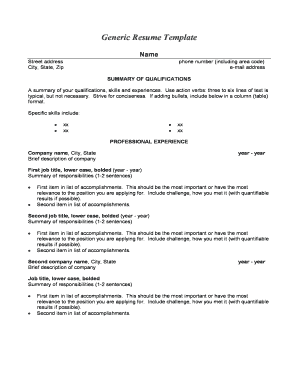
- Begin by entering your personal details at the top of the template. Provide your full name, street address, city, state, and zip code.
- Include your phone number, ensuring to include the area code, and your email address. Make sure these details are up to date for potential employers to reach you.
- In the 'Summary of Qualifications' section, write a brief overview of your skills, experiences, and qualifications. This should be concise, ideally three to six sentences, and can include bullet points for clarity.
- Move on to the 'Professional Experience' section. List your work history starting with the most recent job. For each position, provide the company name, city, and state, along with the years you worked there.
- For each job, state your job title in lower case and bolded. Follow it with a brief summary of your responsibilities, which should be one to two sentences long.
- List your key accomplishments for each employment position. Start with the most significant achievement, detailing the challenge and how you overcame it, ideally with quantifiable results.
- After outlining professional experiences, proceed to the 'Education / Certifications' section. List your degrees starting with the highest level achieved, including the name of the college or university, city, and state.
- If applicable, fill in the 'Professional Affiliations' section detailing any relevant memberships, including the title or position held, name of the affiliation, city, and state, along with the years you have been a member.
- Complete any additional sections relevant to your profile, such as 'Technical Skills,' 'Military Experience,' and 'Published Articles'.
- Once you have filled out all the information, review your resume for accuracy and completeness. Finally, save your changes, download the document, print it, or share it as needed.
Start completing your Generic Resume Template online today!
Related links form
The best resume format is, hands-down, the reverse-chronological format. Here's why: It's very easy to read and skim. Recruiters and hiring managers are familiar with this format, as most people use it.