Loading
Get Benefits Change Form - School District 10 Arrow Lakes - Sd10 Bc
How it works
-

Open form follow the instructions
-

Easily sign the form with your finger
-

Send filled & signed form or save
How to fill out the Benefits Change Form - School District 10 Arrow Lakes - Sd10 Bc online
Filling out the Benefits Change Form is an essential step for users who need to update their benefits information due to changes in family status or other coverage needs. This guide provides a detailed, step-by-step approach to completing the form online, ensuring that users understand each section and requirement.
Follow the steps to complete the Benefits Change Form effectively.
- Click 'Get Form' button to obtain the form and open it in the editor.
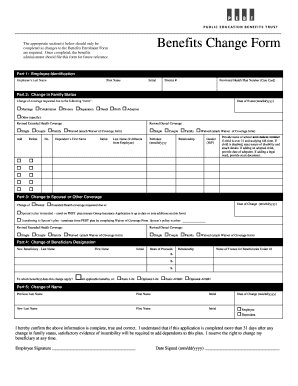
- Begin with Part 1: Employee Identification. Fill in your last name, first name, initial, district number, and your provincial health plan number (care card). Ensure all details are accurate for correct processing.
- Proceed to Part 2: Change in Family Status. Indicate the change of coverage requested due to the applicable event, such as marriage or birth. Provide the date of the event and check the appropriate box. If revising extended health or dental coverage, select your desired coverage option.
- For dependents, enter their first name, initial, last name (if different), birthdate, and relationship to you. If applicable, include educational details for children over 21 or disability information for dependents.
- Move on to Part 3: Change to Spousal or Other Coverage. Specify the coverage being changed and the date of change. Document whether you're enrolling on a new plan or terminating from the existing one, and fill in the necessary details regarding your spouse’s insurance policy.
- Next, in Part 4: Change of Beneficiary Designation, enter your new beneficiary's last name, first name, initial, share of proceeds, and relationship. Also, include the name of the trustee for any beneficiaries under 18 years of age.
- In Part 5: Change of Name, provide your previous and new names along with the date of change. Indicate whether this change applies to you or a dependent.
- Finally, read the confirmation statement, then sign and date the form to ensure its validity. Verify all sections are completed before proceeding.
- After reviewing your completed form, proceed to save changes, download, print, or share the form as needed for further processing.
Complete your Benefits Change Form online today and ensure your benefits are accurately updated!
School District 10 Arrow Lakes is a school district in British Columbia. The districts 5 schools are located in the communities of Nakusp, New Denver, Edgewood and Burton.