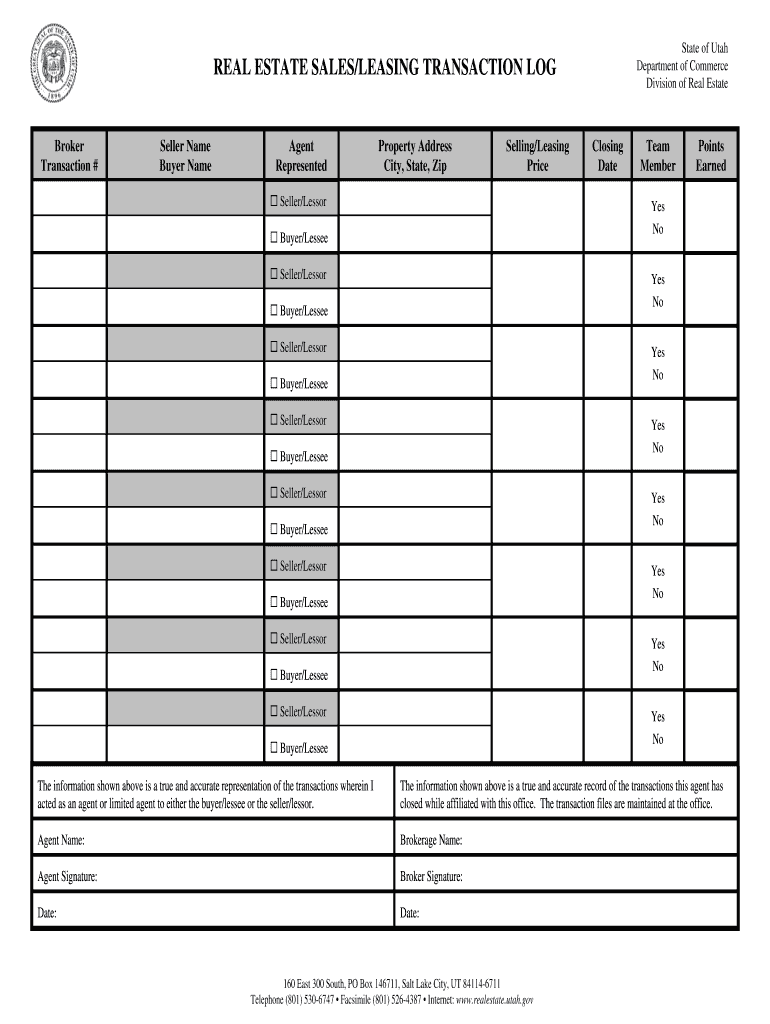
R Yes No Buyer/Lessee Seller/Lessor Yes No Buyer/Lessee Seller/Lessor Yes No Buyer/Lessee Seller/Lessor Yes No Buyer/Lessee The information shown above is a true and accurate representation of the transactions wherein I acted as an agent or limited agent to either the buyer/lessee or the seller/lessor. The information shown above is a true and accurate record of the transactions this agent has closed while affiliated with this office. The transaction files are maint.
Loading

Open form follow the instructions

Easily sign the form with your finger

Send filled & signed form or save
How to fill out the UT Real Estate Sales/Leasing Transaction Log online
Filling out the UT Real Estate Sales/Leasing Transaction Log online is an essential step for real estate professionals in tracking transactions accurately. This guide will help you navigate each section of the form to ensure all necessary information is captured effectively.
Follow the steps to successfully complete the transaction log:
- Click ‘Get Form’ button to obtain the form and open it in the editor.
- Begin by entering the broker's name at the top of the form. This identifies the brokerage responsible for the transaction.
- Fill in the transaction number to uniquely identify this specific transaction.
- Provide the seller's name in the corresponding field, ensuring accuracy in spelling.
- Next, enter the buyer's name, reflecting the individual who is purchasing the property.
- In the agent section, input the name of the agent handling the transaction.
- Indicate whether the agent is representing the buyer or seller in the 'Represented' field.
- Fill out the property address, including the city, state, and zip code for the location being transacted.
- Enter the selling or leasing price of the property, ensuring the figure is accurate and reflects the agreed amount.
- List 'Seller/Lessor' or 'Buyer/Lessee' where applicable, choosing 'Yes' or 'No' for any additional inquiries related to the parties involved.
- Complete any remaining queries concerning the seller or buyer by repeating the previous step as necessary.
- Sign the document by entering the agent's name, followed by the brokerage name.
- The agent and broker must also provide their signatures and dates to validate the transaction log.
- Once all fields are completed, save changes, and decide to download, print, or share the completed form according to your needs.
Complete your transactions online today and ensure accurate documentation with the UT Real Estate Sales/Leasing Transaction Log!
Experience a faster way to fill out and sign forms on the web. Access the most extensive library of templates available.
Related content
The information shown above is a true and accurate record of the transactions this agent...
Consult the U. T. System Administration's Office of Finance before the sale, lease or...
Feb 23, 2017 — Since our founding in 1969, we have remained dedicated to our mission of...
Get answers to your most pressing questions about US Legal Forms API.
Is a lease a real estate transaction?
Yes, a lease is classified as a real estate transaction. This transfer of rights allows a tenant to occupy and use a property, which is formalized with a leasing agreement. To keep track of such transactions, utilizing the UT Real Estate Sales/Leasing Transaction Log offers an organized way to record and reference leasing information.
How do you handle a real estate transaction?
Handling a real estate transaction involves a series of crucial steps, starting with an agreement between the buyer and seller or landlord and tenant. Following this, appropriate documentation is essential, which is often maintained in the UT Real Estate Sales/Leasing Transaction Log. Using comprehensive legal forms can help streamline the process and ensure compliance with state regulations.
Is a lease considered a transaction?
Absolutely, a lease is considered a transaction. It represents an agreement between the landlord and tenant, facilitating the occupancy of the property in exchange for rent. By using the UT Real Estate Sales/Leasing Transaction Log, both parties can keep accurate records of this important transaction.
Is a lease a real estate contract?
A lease qualifies as a real estate contract as it outlines the terms under which one party agrees to rent property from another. It provides the rights and responsibilities of both the landlord and the tenant. To ensure all legal requirements are met, many individuals use the UT Real Estate Sales/Leasing Transaction Log for comprehensive lease documentation.
Is leasing considered real estate?
Yes, leasing is indeed considered a key aspect of real estate. When you lease a property, you create a legal agreement that allows one party to use another party's property for a specified time, usually in exchange for rent. This process is documented in the UT Real Estate Sales/Leasing Transaction Log to ensure clarity and enforceability.
What is considered a real estate transaction?
A real estate transaction involves the transfer of property rights between parties, typically involving the sale or lease of real estate. This process often includes the exchange of funds, contracts, and potentially the UT Real Estate Sales/Leasing Transaction Log to document the activity. Understanding the details of these transactions is crucial for both buyers and sellers.
How does a real estate transaction work?
A real estate transaction works through a series of steps, beginning with negotiation and culminating in closing. During this process, parties engage with tools like the UT Real Estate Sales/Leasing Transaction Log to document key activities. Each step requires attention to detail and adherence to local regulations.
What are the three main parts of a real estate transaction?
The three main parts of a real estate transaction are the pre-contract stage, the contract execution, and the closing process. During these stages, parties review the UT Real Estate Sales/Leasing Transaction Log to ensure transparency. Each stage requires careful documentation and legal compliance.
What is an example of a real estate transaction?
An example of a real estate transaction is when a buyer purchases a home from a seller. This process involves negotiations, inspections, and collecting necessary information, including the UT Real Estate Sales/Leasing Transaction Log. Such transactions are crucial to understanding market trends.
How to handle a real estate transaction?
To handle a real estate transaction effectively, first gather all necessary documents, including the UT Real Estate Sales/Leasing Transaction Log. Next, ensure clear communication between all parties involved. Finally, finalize the transaction by signing the required contracts and recording the deal.
Use professional pre-built templates to fill in and sign documents online faster. Get access to thousands of forms.
If you believe that this page should be taken down, please follow our DMCA take down process here.