Loading
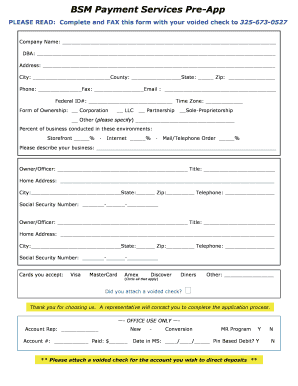
Get Credit Card Merchant Services Pre-app Form
How it works
-

Open form follow the instructions
-

Easily sign the form with your finger
-

Send filled & signed form or save
How to fill out the Credit Card Merchant Services Pre-App Form online
Filling out the Credit Card Merchant Services Pre-App Form online is an essential step for businesses looking to set up merchant services. This guide will provide you with step-by-step instructions to ensure a smooth and accurate application process.
Follow the steps to successfully complete your pre-application form.
- Click ‘Get Form’ button to access the Credit Card Merchant Services Pre-App Form and open it in your preferred editor.
- Enter your company name in the designated field, ensuring that it matches official documents.
- Fill in the DBA (Doing Business As) if different from the company name.
- Provide your complete business address, including city, county, state, and zip code.
- Input your phone number, fax number, and email address for contact purposes.
- Enter your Federal ID number and time zone.
- Select the form of ownership applicable to your business by checking the appropriate box for Corporation, LLC, Partnership, Sole-Proprietorship, or Other.
- Indicate the percentage of your business conducted in different environments: storefront, internet, and mail/telephone order.
- Describe your business in the space provided to give insight into your operations.
- For each owner or officer, fill in the name, title, home address, city, state, zip code, phone number, and social security number.
- Circle all the card types you accept, such as Visa, MasterCard, Amex, Discover, Diners, or specify another.
- Confirm if you have attached a voided check to the application, as it is required for the next steps.
- Once all fields are completed, save your changes and prepare to download or print the form for submission.
Start completing your Credit Card Merchant Services Pre-App Form online today to streamline your application process.
Sign in to your Play Console. Click Settings Payments settings. Under Settings, click Manage Settings. Under Public merchant profile," find your merchant ID.
Industry-leading security and compliance
US Legal Forms protects your data by complying with industry-specific security standards.
-
In businnes since 199725+ years providing professional legal documents.
-
Accredited businessGuarantees that a business meets BBB accreditation standards in the US and Canada.
-
Secured by BraintreeValidated Level 1 PCI DSS compliant payment gateway that accepts most major credit and debit card brands from across the globe.