Loading
Form preview
  • US Legal Forms
  • Other Templates
  • More Forms
  • More Multi-State Forms
  • Abarca Health - Solicitud De Reverso Manual 2doc

Get Abarca Health - Solicitud De Reverso Manual 2doc

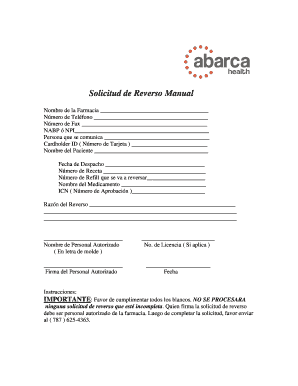
Solicitud de Reverso Manual Nombre de la Farmacia Nmero de Telfono Nmero de Fax NABP NPI Persona que se comunica Cardholder ID ( Nmero de Tarjeta ) Nombre del Paciente Fecha de Despacho Nmero de Receta.

How it works

  1. Open form

    Open form follow the instructions

  2. Easily sign form

    Easily sign the form with your finger

  3. Share form

    Send filled & signed form or save

How to fill out the Abarca Health - Solicitud De Reverso Manual 2doc online

Filling out the Abarca Health - Solicitud De Reverso Manual 2doc online is a straightforward process that allows users to efficiently submit their requests. This guide provides clear and concise instructions to assist you in completing the form correctly and ensuring that all necessary information is included.

Follow the steps to complete the form accurately.

  1. Press the ‘Get Form’ button to retrieve the document and display it in your preferred online editor.
  2. Begin by entering the name of the pharmacy in the designated field.
  3. Provide the pharmacy's phone number in the corresponding space.
  4. Enter the fax number if applicable.
  5. Fill in the NABP or NPI number in the appropriate area.
  6. Identify the person who is in communication regarding the request.
  7. Input the Cardholder ID (Número de Tarjeta) as indicated.
  8. Complete the patient's name in the section provided.
  9. Record the dispatch date in the specified field.
  10. Fill in the prescription number as required.
  11. Indicate the number of refills that are to be reversed.
  12. Provide the name of the medication in the relevant space.
  13. Enter the ICN (Número de Aprobación) number.
  14. Clearly state the reason for the reversal in the space provided.
  15. Include the authorized personnel's name in printed letters.
  16. If applicable, enter the license number of the authorized personnel.
  17. Ensure the authorized personnel signs the form.
  18. Finally, input the date when the form is being completed.
  19. Once all fields are filled in, save your changes. You may also download, print, or share the form as needed.

Get started on your request by completing the Abarca Health - Solicitud De Reverso Manual 2doc online now.

Get form

Experience a faster way to fill out and sign forms on the web. Access the most extensive library of templates available.
Get form

Related content

2017-2018 Manual de Beneficios Del Seguro de...
If you don't understand the information in this handbook, call Iowa ... vigencia de una...
Learn more
Cómo funciona tu Plan - [Certificate] [Evidence]...
Anthem Blue Cross Life and Health Insurance Company ... enviar tu solicitud de revisión...
Learn more

Related links form

Z RO FELT TELES MONDAT VEGYES - Viszki.sulinet.hu Aquatech Utilities A3 Problem Solving Tool (2 Page Portrait) Pdf MCF Volunteer/Contractor Application Form

Get This Form Now!

Use professional pre-built templates to fill in and sign documents online faster. Get access to thousands of forms.
Get form
If you believe that this page should be taken down, please follow our DMCA take down processhere.
Get Abarca Health - Solicitud De Reverso Manual 2doc
Get form
  • Adoption
  • Bankruptcy
  • Contractors
  • Divorce
  • Home Sales
  • Employment
  • Identity Theft
  • Incorporation
  • Landlord Tenant
  • Living Trust
  • Name Change
  • Personal Planning
  • Small Business
  • Wills & Estates
  • Packages A-Z
  • Affidavits
  • Bankruptcy
  • Bill of Sale
  • Corporate - LLC
  • Divorce
  • Employment
  • Identity Theft
  • Internet Technology
  • Landlord Tenant
  • Living Wills
  • Name Change
  • Power of Attorney
  • Real Estate
  • Small Estates
  • Wills
  • All Forms
  • Forms A-Z
  • Other Templates
  • Legal Hub
  • About Us
  • Help Portal
  • Legal Resources
  • Blog
  • Affiliates
  • Contact Us
  • Delete My Account
  • Site Map
  • Industries
  • Forms in Spanish
  • Localized Forms
  • State-specific Forms
  • Forms Kit
  • Real Estate Handbook
  • All Guides
  • Notarize
  • Incorporation services
  • For Consumers
  • For Small Business
  • For Attorneys
  • USLegal
  • FormsPass
  • pdfFiller
  • signNow
  • altaFlow
  • DocHub
  • Instapage
Form Packages
  • Adoption
  • Bankruptcy
  • Contractors
  • Divorce
  • Home Sales
  • Employment
  • Identity Theft
  • Incorporation
  • Landlord Tenant
  • Living Trust
  • Name Change
  • Personal Planning
  • Small Business
  • Wills & Estates
  • Packages A-Z
Form Categories
  • Affidavits
  • Bankruptcy
  • Bill of Sale
  • Corporate - LLC
  • Divorce
  • Employment
  • Identity Theft
  • Internet Technology
  • Landlord Tenant
  • Living Wills
  • Name Change
  • Power of Attorney
  • Real Estate
  • Small Estates
  • Wills
  • All Forms
  • Forms A-Z
  • Other Templates
Customer Service
  • Legal Hub
  • About Us
  • Help Portal
  • Legal Resources
  • Blog
  • Affiliates
  • Contact Us
  • Delete My Account
  • Site Map
  • Industries
  • Forms in Spanish
  • Localized Forms
  • State-specific Forms
  • Forms Kit
Legal Guides
  • Real Estate Handbook
  • All Guides
Prepared for you
  • Notarize
  • Incorporation services
Our Customers
  • For Consumers
  • For Small Business
  • For Attorneys
Our Sites
  • USLegal
  • FormsPass
  • pdfFiller
  • signNow
  • altaFlow
  • DocHub
  • Instapage
Social Media
Call us now toll free:
+1 833 426 79 33
As seen in:
© Copyright 1999-2026 airSlate Legal Forms, Inc. 17 Station Street, Ste. 203, Brookline, MA 02445
  • Your Privacy Choices
  • Terms of Service
  • Privacy Notice
  • Content Takedown Policy
  • Bug Bounty Program