Loading
Get Fba National
How it works
-

Open form follow the instructions
-

Easily sign the form with your finger
-

Send filled & signed form or save
How to fill out the Fba National commuter benefits enrollment form online
Navigating the Fba National commuter benefits enrollment form can be straightforward with the right guidance. This comprehensive guide provides a clear, step-by-step approach to ensure you complete the form accurately and effectively.
Follow the steps to successfully complete the enrollment form.
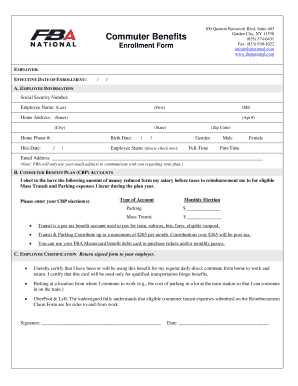
- Click ‘Get Form’ button to obtain the form and open it in your editor.
- Begin by filling in the employer name and the effective date of enrollment. Ensure the date is correctly formatted.
- In Section A: Employee Information, provide your Social Security number, full name including last, first, and middle initial. Enter your home address, including street, apartment number, city, state, and zip code. Also include your home phone number, hire date, and birth date.
- Indicate your gender and employee status by checking the appropriate box for either full-time or part-time. Additionally, provide your email address, keeping in mind that this will be used solely for communications regarding your plan.
- In Section B: Commuter Benefit Plan Accounts, select the amount of money you wish to have deducted from your salary for the pre-tax reimbursement of eligible mass transit and parking expenses. Enter your monthly election amounts for both the parking and mass transit options.
- Understand that the transportation benefits can be used for train, subway, bus, ferry, and eligible vanpool expenses, and that contributions over the maximum of $265 will be post-tax. You may also use the FBA Mastercard benefit debit card for purchasing transport tickets and monthly passes.
- In Section C: Employee Certification, read the certification statement carefully. By signing the form, you confirm that you will use the benefits for your daily commute and describe other eligible expenses.
- Finally, sign and date the form before returning it to your employer. Ensure all information is accurate and complete.
Complete your documents online today for a smoother processing experience.
If you already have a MyFlexAccount.com or My Flex Account Mobile user ID, you can enter it and tap log in. You may be asked some security questions and then be prompted to enter your password. My Flex Account Mobile you must register before you can access the application.