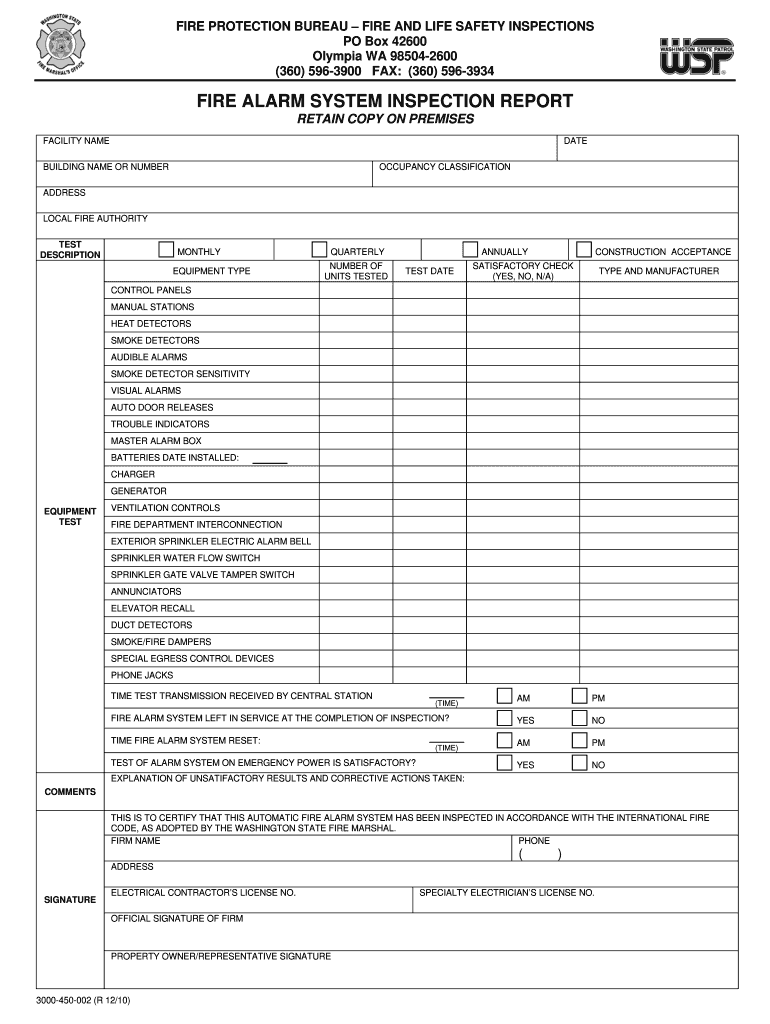
FIRE PROTECTION BUREAU FIRE AND LIFE SAFETY INSPECTIONS PO Box 42600 Olympia WA 98504-2600 (360) 596-3900 FAX: (360) 596-3934 FIRE ALARM SYSTEM INSPECTION REPORT RETAIN COPY ON PREMISES DATE FACILITY.
Loading

Open form follow the instructions

Easily sign the form with your finger

Send filled & signed form or save
How to fill out the Fire Alarm Inspection Report Template online
The Fire Alarm Inspection Report Template is an essential document for ensuring the safety and compliance of fire alarm systems. This guide provides clear, step-by-step instructions for filling out the form online to facilitate a thorough inspection process.
Follow the steps to complete the Fire Alarm Inspection Report Template online.
- Press the ‘Get Form’ button to access the Fire Alarm Inspection Report Template and open it in the editing interface.
- Fill in the date of the inspection, ensuring accuracy for record-keeping purposes.
- Enter the facility name where the inspection is taking place along with the corresponding occupancy classification.
- Indicate the building name or number and provide the full address of the facility.
- Select the local fire authority responsible for the area by entering relevant details.
- In the 'Test Description' section, categorize the type of tests being conducted, specifying whether they are monthly, quarterly, or annual.
- Record the number of units tested for each equipment type that is being verified.
- Document the test date, ensuring it aligns with the agreed inspection timeline.
- For each component listed, indicate its condition by checking 'Satisfactory' and providing a response of Yes, No, or N/A.
- Enter details about specific equipment, including type and manufacturer, and note the date installed for batteries and chargers.
- Complete information regarding ventilation controls, fire department interconnection, and any related systems.
- Confirm if the fire alarm system was left in service post-inspection by selecting Yes or No.
- Document the time the fire alarm system was reset, using the designated AM/PM format.
- Fill in whether the test of the alarm system on emergency power was satisfactory and provide an explanation for unsatisfactory results if applicable.
- Add any additional comments or observations in the comments section.
- Certify the inspection by signing and providing the necessary details for the inspecting firm and property owner representative.
- Once all required information is completed, save your changes, download the form for your records, or share it as needed.
Begin completing your Fire Alarm Inspection Report Template online today.
Experience a faster way to fill out and sign forms on the web. Access the most extensive library of templates available.
Related content
ALARM-INITIATING DEVICES AND CIRCUIT INFORMATION ... INSPECTION AND TESTING FORM...
Use the Checklist to conduct your own fire inspections in-between your annual Fire...
Items 9 - 32 — Fire Alarm Systems, UL 864, you must limit certain programming ... Fire...
Get answers to your most pressing questions about US Legal Forms API.
How do I know if my smoke detector is bad?
The Signs Which Indicate Your Smoke Detector May Be Failing (or Has Failed!) The smoke detector is intermittently going off for no reason. Random chirping, even after replacing the battery. The test button fails to operate the siren on the smoke detector.
What happens during a fire alarm inspection?
To inspect and test the fire alarms, it takes a team of two technicians. The first technician is stationed at the fire alarm panel, while the second technician goes from floor to floor inspecting and testing the smoke detectors, fire alarm pull stations, and the fire alarm horns & strobes.
How often do fire alarms need to be inspected?
Visual Inspections: visual inspections of fire alarm components may be required as frequently as once a week or infrequently as twice a year. Weekly Visual Inspection: control panels and equipment, such as the power supplies, fuses, LEDs, and trouble signals must be visually inspected weekly.
How do you test a fire alarm call point?
Insert the test key in to the bottom of the fire alarm point. At the panel, turn the key anti-clockwise. Access LED illuminates. Pres red silence key. Push the fire alarm point upwards to reset. Press the green reset key on the panel.
Does smoke detector notify fire department?
Fast emergency response: A monitored fire alarm system notifies critical parties as soon as a pull station is activated, sprinkler head goes off, or a smoke detector identifies smoke. It signals the monitoring station, which notifies both the fire department and your fire protection company.
What does a fire alarm system consist of?
All the functions of a fire alarm system are accomplished by a series of inputs and outputs. The system inputs consist of fire detection devices and system monitoring devices that activate the control panel and the outputs are responsible for occupant notification and control functions associated with life safety.
What is a fire alarm test?
The fire alarm testing will test to ensure all components are in working order. ... This includes smoke detectors, pull stations, and horns and strobes. Other components tied into the system such as fire doors, elevators and emergency shutdown equipment will be tested as well.
What is fire alarm inspection?
Fire alarm inspections and tests are necessary to ensure that all existing alarms are compliant with NFPA 72, the National Fire Alarm and Signaling Code. These inspections may also reveal areas of a building's fire signaling system in need of repairs or replacement.
What does a red flash mean on a smoke detector?
Smoke alarms will make a 'beep' or 'chirping' sound when they have a low battery or are faulty. ... All smoke Alarms also have a red light that flashes momentarily every 40-60 seconds to visually indicate they are operating. This same red light flashes continuously when the Smoke Alarm has been activated.
How do you inspect a smoke detector?
Press and hold the test button on the smoke detector. It can take a few seconds to begin, but a loud, ear-piercing siren should emanate from the smoke detector while the button is pressed. If the sound is weak or nonexistent, replace your batteries.
Use professional pre-built templates to fill in and sign documents online faster. Get access to thousands of forms.
If you believe that this page should be taken down, please follow our DMCA take down process here.