Loading
Get Wa Hca 20-0117 2019-2026
How it works
-

Open form follow the instructions
-

Easily sign the form with your finger
-

Send filled & signed form or save
How to fill out the WA HCA 20-0117 online
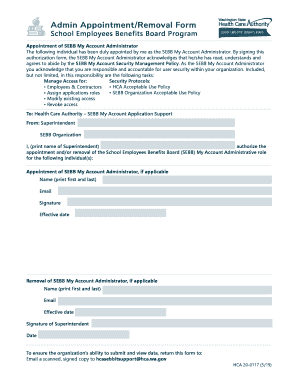
Filling out the WA HCA 20-0117 form online is a straightforward process that enables you to appoint or remove a School Employees Benefits Board (SEBB) My Account Administrator. This guide provides clear, step-by-step instructions to assist you in completing the form accurately.
Follow the steps to fill out the WA HCA 20-0117 form online.
- Click the ‘Get Form’ button to obtain the form and open it in the online form editor.
- In the designated field, print the name of the Superintendent who is authorizing the appointment or removal of the SEBB My Account Administrator.
- For the appointment section, print the first and last name of the individual being appointed as the SEBB My Account Administrator.
- Enter the email address of the appointed individual to ensure they receive necessary communications.
- The appointed administrator must sign the form acknowledging their understanding of the SEBB My Account Security Management Policy.
- Fill in the effective date of the appointment for clear documentation.
- For the removal section, print the first and last name of the individual being removed, along with their email address.
- Specify the effective date for the removal to ensure proper records.
- The Superintendent must sign and date the form to validate the appointment or removal.
- After completing the form, save your changes, then download, print, or share the form as needed.
Complete your documents online today!