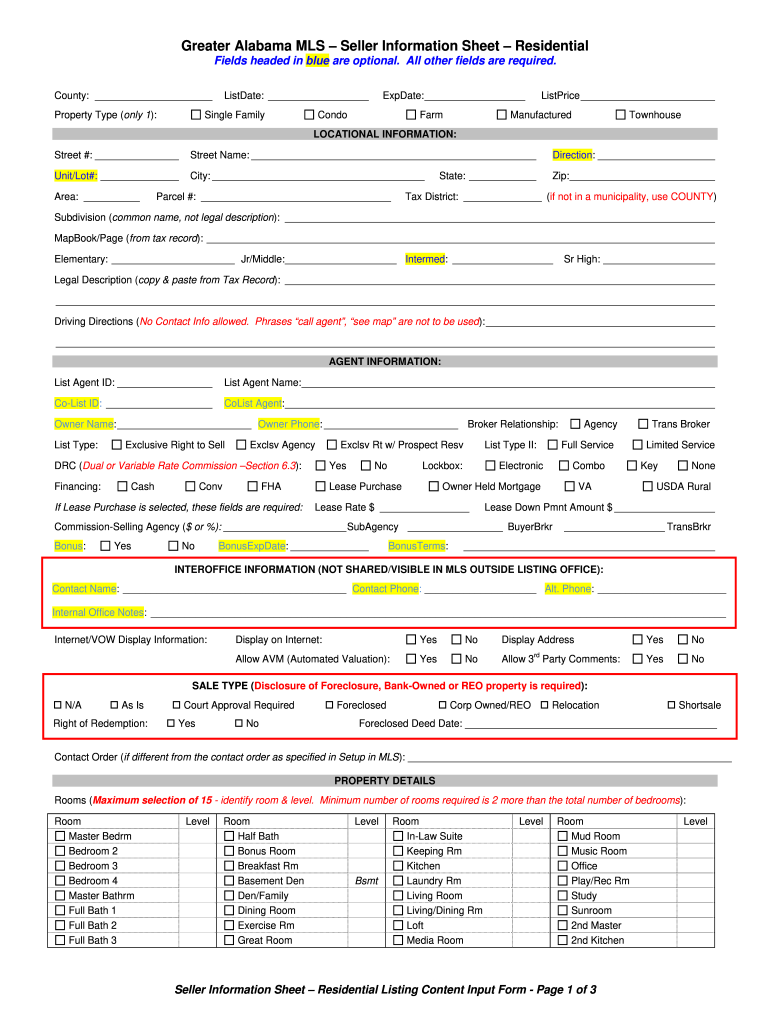
Et: Yes Allow AVM (Automated Valuation): Yes No Display Address Yes No No rd Yes No Allow 3 Party Comments: SALE TYPE (Disclosure of Foreclosure, Bank-Owned or REO property is required): N/A As Is Right of Redemption: Court Approval Required Yes No Foreclosed Corp Owned/REO Relocation Shortsale Foreclosed Deed Date: _____________________________________________ Contact Order (if different from the contact order as specified in Setup in ML.
Loading

Open form follow the instructions

Easily sign the form with your finger

Send filled & signed form or save
How to fill out the AL MLS Seller Information Sheet Residential online
Completing the AL MLS Seller Information Sheet Residential online is an essential step for sellers looking to list their property. This guide will walk you through the key components of the form, providing detailed instructions to ensure all required information is accurately captured.
Follow the steps to successfully complete the seller information sheet.
- Click the ‘Get Form’ button to acquire the seller information sheet and open it in your online editor.
- Fill out the required fields at the top of the form, including County, Property Type, List Date, Expiration Date, and List Price. Ensure the Property Type is selected from the provided options.
- Enter the locational information for the property, including Street Number, Street Name, Direction, Unit/Lot Number, City, Zip Code, Area, and Parcel Number. Be consistent and double-check for accuracy.
- Complete the Tax District and Subdivision fields. Provide the common name for the Subdivision and Map Book/Page from the tax record.
- Provide school information for the property, listing Elementary, Jr/Middle, Intermediate, and Senior High schools.
- Include the legal description of the property. This may need to be copied from the tax record, ensuring it is complete.
- Draft the driving directions to the property, ensuring you follow the guidelines by not including contact information or phrases like 'call agent.'
- Under agent information, enter the List Agent ID, List Agent Name, Co-List ID, and Co-List Agent information.
- Fill in the Owner Name and Phone, as well as the Broker Relationship and List Type. Select the appropriate financing options available.
- Proceed to fill out the property details section, entering the number of bedrooms, bathrooms, year built, and any relevant features or disclosures.
- Continue through the remaining property details, including condition, amenities, and utility features, and make sure to mark any applicable fees or association details.
- Review all information entered in the form for completeness and accuracy before finalizing.
- After ensuring that all fields are complete, save your changes, then download, print, or share the completed seller information sheet as needed.
Start filling out your seller information sheet online today to facilitate your property listing process.
Experience a faster way to fill out and sign forms on the web. Access the most extensive library of templates available.
Related content
There are basically three types of real estate brokerage relationships that can be...
by LJ White · Cited by 37 — The agent advises the seller as to an appropriate asking...
Feb 12, 2021 — Indicate by check mark whether the registrant is a large accelerated...
Get answers to your most pressing questions about US Legal Forms API.
How do I make my listing active on MLS?
To make your listing active on MLS, ensure you have completed all required fields in your AL MLS Seller Information Sheet Residential accurately. Once everything is submitted, the listing typically becomes active within a specific timeframe set by the MLS. Your real estate agent can assist in monitoring the status and ensuring that your listing is live for potential buyers.
Why would a house not be listed on MLS?
Several reasons might prevent a home from being listed on MLS, such as the owner's preference for private sales or the property failing to meet MLS criteria. Additionally, some sellers may choose to market their homes through other channels if they think it will attract the right buyers. Understanding the AL MLS Seller Information Sheet Residential and its requirements can help ensure your listing is eligible and properly submitted.
Is a MLS listing worth it?
A MLS listing is often considered worth it because it enhances property visibility and connects sellers with a broader audience. Listings on MLS can help sell properties faster and often at better prices due to increased competition. Utilizing an AL MLS Seller Information Sheet Residential can maximize the effectiveness of your listing, giving it a professional touch that instills buyer confidence.
How do I list on local MLS?
To list on a local MLS, you typically need to work with a licensed real estate agent who has access to the network. They will help you prepare your AL MLS Seller Information Sheet Residential and ensure all relevant details are included. Using an agent can streamline the process, ensuring your listing gets the visibility it needs to attract potential buyers.
How do I write an MLS listing?
Writing an MLS listing requires clear and engaging details about your property. Focus on the property's key features such as its location, size, and unique attributes. Remember to include high-quality images and utilize the AL MLS Seller Information Sheet Residential to present all relevant information effectively, making it easy for potential buyers to understand what your property offers.
What is an MLS document?
An MLS document broadly refers to any form of paperwork associated with the Multiple Listing Service, including contracts, listing agreements, and data sheets. These documents are integral in the real estate transaction process. To ensure compliance and accuracy, consider utilizing US Legal Forms while preparing your AL MLS Seller Information Sheet Residential.
What is the meaning of MLS list?
An MLS list is a compilation of properties listed for sale within a specific real estate market managed by a Multiple Listing Service. It serves as a powerful tool for agents and buyers to access available properties. If you’re working with an AL MLS Seller Information Sheet Residential, knowing how to navigate this list is fundamental to your success.
What is an MLS data sheet?
An MLS data sheet is a structured document containing key information regarding listings maintained by the Multiple Listing Service. This sheet may include details about the property's condition, square footage, and local amenities. When looking to create an AL MLS Seller Information Sheet Residential, you will find that a comprehensive data sheet is a valuable reference.
How do I get MLS access without being a realtor?
Obtaining MLS access without being a realtor is challenging but possible through some alternative avenues. Some local MLSs offer public access options or subscriptions for non-agents. Additionally, using services like US Legal Forms may provide you with essential resources related to AL MLS Seller Information Sheet Residential, helping you understand the local market.
Can you download MLS data?
Yes, you can download MLS data, but the process may vary based on the MLS provider. Typically, real estate agents and brokers have direct access and can export data into formats like spreadsheets. For those seeking AL MLS Seller Information Sheet Residential, leveraging platforms like US Legal Forms can simplify obtaining this information.
Use professional pre-built templates to fill in and sign documents online faster. Get access to thousands of forms.
If you believe that this page should be taken down, please follow our DMCA take down process here.