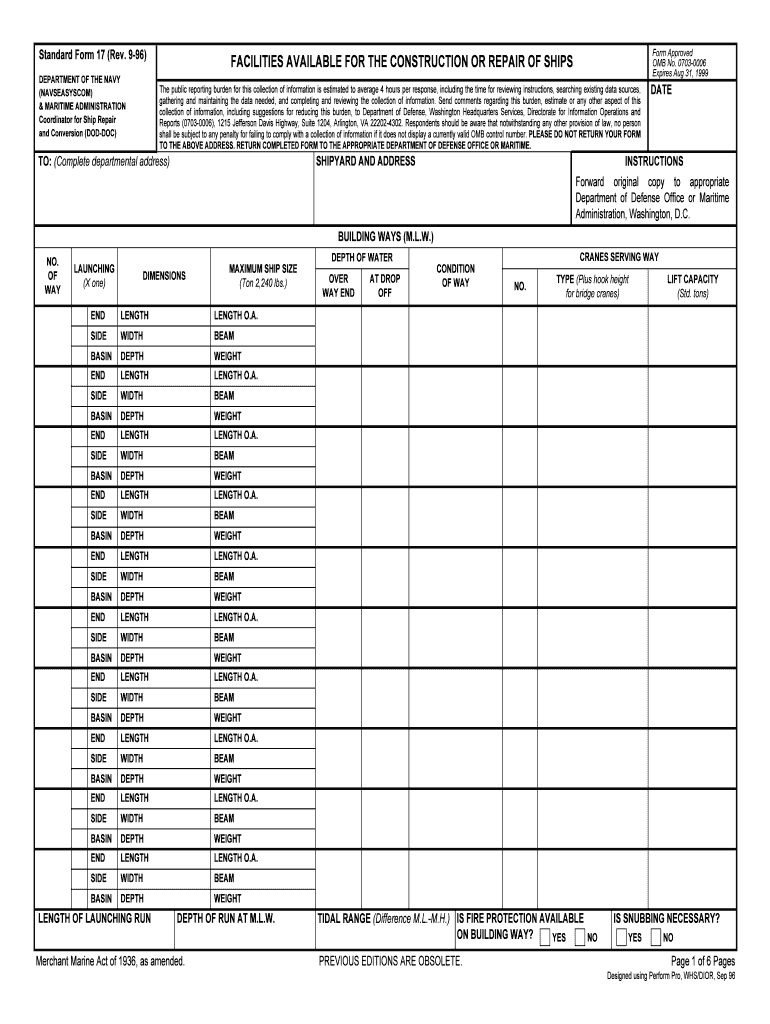
IES AVAILABLE FOR THE CONSTRUCTION OR REPAIR OF SHIPS The public reporting burden for this collection of information is estimated to average 4 hours per response, including the time for reviewing instructions, searching existing data sources, gathering and maintaining the data needed, and completing and reviewing the collection of information. Send comments regarding this burden, estimate or any other aspect of this collection of information, including suggestions for reducing this burden, to De.

Open form follow the instructions

Easily sign the form with your finger

Send filled & signed form or save
How to fill out the GSA SF 17 online
This guide provides clear and detailed instructions for users on how to fill out the GSA SF 17 form online, ensuring a seamless experience. Whether you are new to this type of documentation or seeking a refresher, our step-by-step approach will support you in completing the form accurately.
Follow the steps to successfully complete the GSA SF 17 online.
- Press the ‘Get Form’ button to access the document and open it in your preferred editing interface.
- Begin by providing the shipyard name and address in the designated section. Make sure to include a complete departmental address to ensure proper routing.
- Fill in the date on which you are completing the form. This helps with records and ensures the document is timely.
- In the section labeled 'Building Ways,' specify the number of ways available, the launching dimensions, and the maximum ship size that can be accommodated. Ensure accuracy when entering weight and dimension details.
- Document the condition of the ways and indicate if fire protection is available, along with any snubbing requirements.
- Move on to the 'Ship's Berths' section where you will need to detail the number and dimensions of piers, mooring dolphins, and wharves available. Record the relevant water depth and height of dock.
- In the 'Cranes Serving Berths' part, detail the types of cranes available, their lift capacity, and the height of the hook.
- Fill out the 'Drydocks' section similarly, capturing all relevant details regarding types of drydocks and the maximum ship size each can accommodate.
- Complete the sections on 'Principal Shops and Buildings' by listing dimensions, materials processed, and the largest exit widths of each shop.
- For any additional machine tools or equipment, succinctly list their capabilities, ensuring clarity in the descriptions provided.
- Once all sections are completed, review your entries for accuracy and comprehensiveness.
- Finally, save your completed document. You can choose to download, print, or share the form as needed.
Complete your GSA SF 17 online today and streamline your documentation process.
Experience a faster way to fill out and sign forms on the web. Access the most extensive library of templates available.
Related content
Form: SF17. Facilities Available for the Construction or Repair of Ships. Current Revision...
submit to GSA a Standard Form 360, Request for Clearance of an Interagency ... OF 16...
Global Services Agreement (GSA) · GSA Service Terms · Service Terms for UL...
Get answers to your most pressing questions about US Legal Forms API.
Can a new company get on the GSA schedule?
Potential contractors must be in business for at least 2 years before they acquire a GSA Schedule contract. However, this requirement can be waived for certain contractors (under any Large Category), provided they meet the requirements for the Springboard Program.
Are GSA schedules considered commercial?
The GSA Schedule, also known as Federal Supply Schedule, and Multiple Award Schedule (MAS), is a long-term governmentwide contract with commercial companies that provide access to millions of commercial products and services at fair and reasonable prices to the government.
What is the difference between GSA and sam?
Washington — On Monday, April 4, 2022, SAM.gov and all other General Services Administration (GSA) systems will switch to the new Unique Entity ID (SAM) as the authoritative government entity identifier. This means SAM.gov and other GSA systems will no longer use the DUNS number for identifying entities.
Are GSA schedules competitively awarded?
Government ordering activities must follow when issuing orders using GSA Schedules. Awards made following these procedures are considered competitive.
Is it worth it to get on the GSA schedule?
Benefits of Getting On a GSA Schedule A GSA Schedule contract allows direct access to the U.S. federal government, the largest buyer of goods and services in the world. If selling technology or security solutions, GSA Schedule contractors can sell to state and local government entities as well as public schools.
What is the GSA supply schedule?
The GSA Schedule, also known as Federal Supply Schedule, and Multiple Award Schedule (MAS), is a long-term governmentwide contract with commercial companies that provide access to millions of commercial products and services at fair and reasonable prices to the government.
What is the basis of award in GSA?
What is a Basis of Award (BOA) Customer? If you opt into Commercial Sales Practices (CSP) with your GSA contract, you have to outline all the customer classes you have sold to in the past 12 months and what discounts you have offered these customers.
What is the 5 year GSA contract?
The process includes a negotiation of pricing, terms and conditions. The resulting award gives the government your best price for 5 years and can be renewed by you for up to a total of 20 years. And don't worry, your pricing can change as your business changes.
Use professional pre-built templates to fill in and sign documents online faster. Get access to thousands of forms.
If you believe that this page should be taken down, please follow our DMCA take down process here.