Loading
Get Gsa Of 289 1981-2026
How it works
-

Open form follow the instructions
-

Easily sign the form with your finger
-

Send filled & signed form or save
How to fill out the GSA OF 289 online
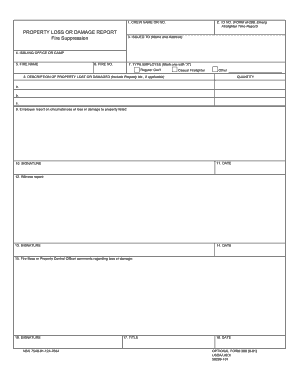
The GSA OF 289 is a crucial form used for reporting property loss or damage related to fire suppression. This guide will provide you with a clear and comprehensive walkthrough for completing this form online, ensuring that you can successfully document the necessary information.
Follow the steps to fill out the GSA OF 289 online.
- Press the ‘Get Form’ button to acquire the GSA OF 289 form and access it in your chosen online viewer.
- Enter the crew name or number in the appropriate field to identify the reporting team.
- Provide the ID number as referenced by the Form OF-288, which is the Emergency Firefighter Time Report.
- Fill in the name and address of the person or entity to whom the form is issued.
- Indicate the issuing office or camp where the report originates.
- Document the fire name relevant to the incident being reported.
- Include the fire number for proper identification of the specific incident.
- Select the type of employee by marking one of the options with an 'X': Regular Government employee, Casual Firefighter, or Other.
- Detail the quantity of property lost or damaged. Include the description, such as the property number if applicable.
- Write an employee report documenting the circumstances surrounding the loss or damage of the listed property.
- Enter the date of the incident or report.
- Sign the form where indicated to validate the report.
- If applicable, include a witness report regarding the loss or damage.
- Have the witness sign and date the report.
- Include comments from the Fire Boss or Property Control Officer concerning the loss or damage.
- Sign and date the form in the specified section.
- Provide your title in the designated area.
- Final review: ensure all information is accurate and complete. Save changes to the document, download a copy, print it for records, or share it as needed.
Start filling out your GSA OF 289 online today to ensure your property loss or damage report is submitted efficiently.