Loading
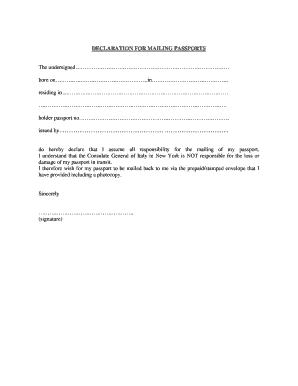
Get Declaration For Mailing Passports
How it works
-

Open form follow the instructions
-

Easily sign the form with your finger
-

Send filled & signed form or save
How to fill out the Declaration For Mailing Passports online
The Declaration For Mailing Passports is an important document that ensures the safe handling of your passport during transit. This guide provides clear and step-by-step instructions to help you complete the form easily and accurately online.
Follow the steps to fill out the Declaration For Mailing Passports online
- Press the ‘Get Form’ button to access the Declaration For Mailing Passports and open it for completion.
- In the first field, enter your full name as it appears on your passport.
- Provide your birthdate in the format of month, day, and year.
- Indicate the city or place of your birth in the designated field.
- Fill in your current residence address, ensuring to include the street address, city, state, and zip code.
- Enter your passport number as indicated on the document.
- Input the name of the authority that issued your passport.
- In the declaration section, review the statement regarding your responsibility for the mailing of your passport and confirm your understanding.
- Sign the document with your signature in the provided space.
- Once completed, you can save your changes, download, print, or share the form as needed.
Start filling out your Declaration For Mailing Passports online today.