Loading
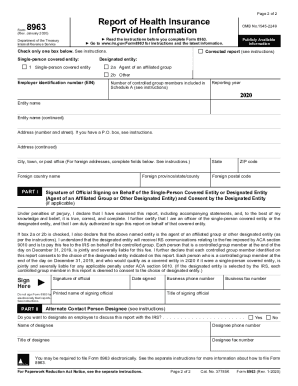
Get Irs 8963 2020-2026
This website is not affiliated with IRS
How it works
-

Open form follow the instructions
-

Easily sign the form with your finger
-

Send filled & signed form or save
How to fill out the IRS 8963 online
Filling out the IRS 8963 form is essential for reporting health insurance coverage. This guide offers clear, professional, and supportive steps to help users complete the form accurately and efficiently online.
Follow the steps to complete the IRS 8963 online.
- Click ‘Get Form’ button to obtain the form and open it in a document editor.
- Read the instructions provided carefully before proceeding with filling out the form to ensure you understand the requirements.
- Check one box under the ‘Publicly Available Information’ section to indicate whether you are a single-person covered entity, designated entity, or submitting a corrected report.
- Enter the employer identification number (EIN) and the reporting year in the designated fields.
- Fill out the entity information, including the entity name, address (including city, state, ZIP code), and any applicable foreign address details.
- In Part I, ensure that the signature of the official signing on behalf of the entity is included, along with the date signed and their printed name.
- Provide the business phone and fax numbers for the signing official, as well as their title.
- Designate an alternate contact person if necessary, and indicate whether they should be permitted to discuss this report with the IRS.
- In Schedule A, provide information for the single-person covered entity or designated entity, and separately list details for each controlled group member.
- Complete the required fields for each member, including EIN, entity name, address, NAIC code, direct premiums written, MLR rebates, and any other required financial information.
- After completing all sections, review the form for accuracy and completeness.
- When ready, you can save your changes, download a copy, print the form, or share it as needed.
Complete your IRS forms online accurately and efficiently today.