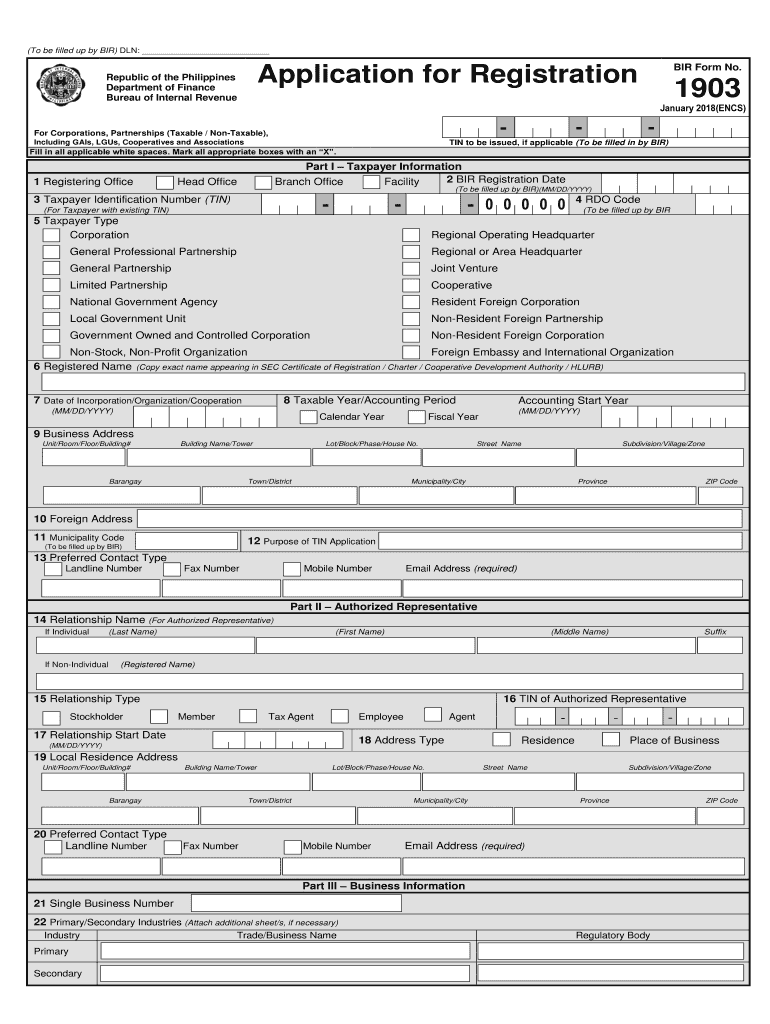
(To be filled up by BIR) DLN: BIR Form No.Application for RegistrationRepublic of the Philippines Department of Finance Bureau of Internal Revenue1903 January 2018(ENCS)For Corporations, Partnerships.
Loading

Open form follow the instructions

Easily sign the form with your finger

Send filled & signed form or save
How to fill out the PH BIR 1903 online
The PH BIR 1903 form is essential for various entities seeking to register with the Bureau of Internal Revenue in the Philippines. This guide provides clear and systematic instructions for users to fill out the form online, ensuring a smooth registration process.
Follow the steps to successfully complete the PH BIR 1903 form.
- Click the ‘Get Form’ button to obtain the form and open it for online editing.
- Begin completing Part I – Taxpayer Information. Start with the 'Registering Office' by indicating whether it is a branch office or head office. Ensure to fill in the tax identification number (TIN) if applicable.
- Fill in the 'BIR Registration Date' in MM/DD/YYYY format. If you do not have a pre-existing TIN, leave that section blank as it is for the Bureau of Internal Revenue to complete.
- Select the 'Taxpayer Type' from the available options, marking the appropriate box with an 'X'. This includes, but is not limited to, corporation, general professional partnership, cooperative, and various government entities.
- Provide the 'Registered Name' exactly as it appears in the SEC Certificate of Registration or relevant charter documents.
- Indicate the 'Date of Incorporation/Organization/Cooperation'. This should also be in MM/DD/YYYY format.
- Select your 'Taxable Year/Accounting Period' and specify if it is a calendar or fiscal year.
- Enter the complete 'Business Address', including all necessary fields such as building name, street name, municipality/city, and ZIP code.
- If applicable, fill in your 'Foreign Address'. You may also specify the 'Purpose of TIN Application' as required in the form.
- Complete the 'Preferred Contact Type' section with your preferred method of communication, including email, which is mandatory.
- Move on to Part II - Authorized Representative. Provide the relationship and name details of the authorized representative. Clearly indicate their TIN if available.
- Complete the local residence address and preferred contact details for the authorized representative.
- In Part III – Business Information, provide your single business number and primary/secondary industries. Be sure to include any relevant licenses or regulatory details.
- For facilities, accurately fill out Part IV with the facility code and details, ensuring you choose the correct type.
- Address the various tax types in Part V. Check all applicable taxes that relate to your business operations.
- In Part VI, fill in the 'Authority to Print Receipts and Invoices' section by providing the printer’s details.
- Proceed to Part VII and list all stockholders, partners, or members involved, ensuring to attach additional sheets if necessary.
- Finally, complete the declaration at the end of the form, ensuring it is signed by an authorized individual. Enter the TIN of the signatory along with their title, position, and any additional relevant details.
- Once all fields are completed, save your changes. You can also download, print, or share the form as needed.
Complete your PH BIR 1903 registration online today for a quicker and more efficient process.
Experience a faster way to fill out and sign forms on the web. Access the most extensive library of templates available.
Related content
The Minneapolis journal. [volume] (Minneapolis, Minn.) 1888-1939.
markers, a population genetic structure of Ph. colchicus from Iowa (United States)...
This is a list of the largest known epidemics (including pandemics) caused by an...
Get answers to your most pressing questions about US Legal Forms API.
What is RDO code?
Are you looking for your RDO Code? This acronym equates to Revenue District Office and the code stands for a specific location. The RDO is a sector under the Bureau of Internal Revenue or BIR which keeps records of taxpayers who fall under their jurisdiction.
What is EO 98 Philippines?
Executive Order No. 98. d. Protective Security - A personnel of the PNP, primarily from the PSPG, detailed to civilian government offices, officials or individuals for the purpose of providing security and ensuring their safety.
How do I get my RDO code?
How will you know your RDO Code? Check BIR Form 1901, 1902, 1903, 1904, or 1905. Find the copy of the BIR Forms you filled out while you were applying for a TIN. ... Get in Touch with BIR Agents Via the Hotline. Another way to recover or retrieve your RDO code is by contacting the BIR hotline. ... Personally Visit the RDO.
How can I update my tin ID in Philippines?
Steps to Replace Lost or Damaged TIN ID Fill out the BIR Form 1905. ... Under “Reason/Details,” put an X on the “Lost/Damaged” box. Proceed to the Certificate of Registration (COR) Update window and submit your accomplished BIR Form 1905 and other requirements.
What is the meaning of 0619e?
BIR Form 0619-E or Monthly Remittance Form for Creditable Income Taxes Withheld (Expanded) is a remittance form that is used for remittance of expanded withholding taxes, as mentioned within the provisions of Revenue Regulations No.
What is Form 1903 in Philippines?
What is form 1903 BIR? The BIR Form 1903 is the tax form that corporate taxpayers, whether taxable or non-taxable, use to register their organization with the BIR and secure a TIN. Corporations should file the BIR Form 1903 on or before the start of their operations.
How many BIR forms are there in the Philippines?
The eBIRForms is a package application covering thirty-six (36) BIR Forms comprised of Income Tax Returns; Excise Tax Forms; VAT Forms; Withholding Tax Forms; Documentary Stamp Tax Forms; Percentage Tax Forms; ONETT Forms and Payment Form, the list of which is shown below.
What is Annex A1 form?
Annex A1 - Application for Recognition or Recognition and Enforcement.
Use professional pre-built templates to fill in and sign documents online faster. Get access to thousands of forms.
If you believe that this page should be taken down, please follow our DMCA take down process here.