You may ask the department to withhold your name and address from those lists. Form MV3592 is available at DMV Customer Service Centers and at: www.dot.wisconsin.gov/forms. ADA: The Wisconsin Department of Transportation complies with the Americans with Disabilities Act. Information Regarding Title to Lien Holder July 30, 2012, Wisconsin became a title to lien holder (lender) state. Any title with a lien (loan) listed as of July 30, 2012, will be sent to the lien holder rather than the owner.

Open form follow the instructions

Easily sign the form with your finger

Send filled & signed form or save
How to fill out the WI DoT MV2119 online
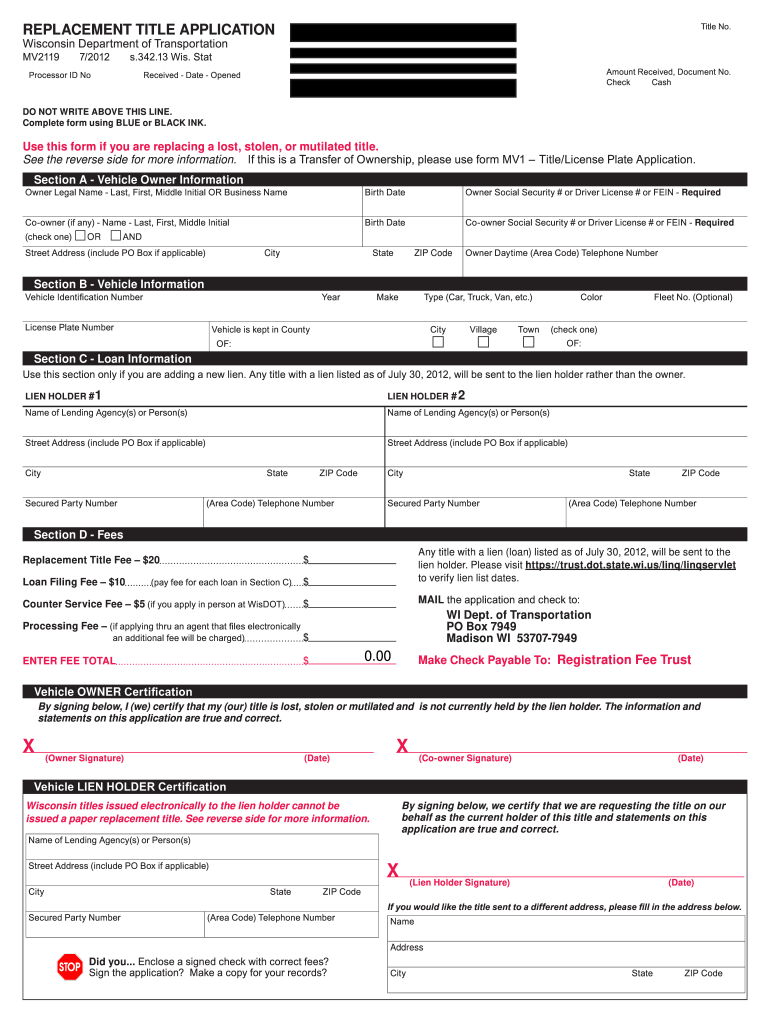
The WI DoT MV2119 form is used to apply for a replacement title for a lost, stolen, or mutilated vehicle title in Wisconsin. Completing this form online can simplify the process and ensure that your application is submitted correctly.
Follow the steps to fill out the form accurately and efficiently.
- Click ‘Get Form’ button to obtain the form and open it for editing.
- In Section A, provide the vehicle owner information clearly. Include your legal name, social security number or driver's license number, and the street address. If applicable, fill in the co-owner's details and indicate whether ownership is shared by selecting 'AND' or 'OR'.
- In Section B, enter the vehicle information, including the vehicle identification number (VIN), license plate number, make, model year, and the color of the vehicle. Also, specify the county and city where the vehicle is kept.
- If you are adding a new loan to the vehicle, complete Section C with details of the lien holder(s), including their name, address, and telephone numbers. Review to ensure accuracy as this information is crucial for processing.
- In Section D, calculate and enter the fees due for the replacement title, including the replacement title fee and any loan filing fees if applicable. Make sure to total the fees and prepare your payment correctly.
- Once all sections are filled out correctly, sign and date the application in the designated areas provided for the owners and any lien holders.
- After signing, review the form for any errors and save your changes. You can then download, print, or share the completed form as needed.
Complete your documents online today to ensure timely processing.
Experience a faster way to fill out and sign forms on the web. Access the most extensive library of templates available.
Related content
ADA: The Wisconsin Department of Transportation complies with the Americans with...
Get answers to your most pressing questions about US Legal Forms API.
How to fill out DMV Statement of Facts form?
When filling out the DMV Statement of Facts form in Wisconsin, provide clear and concise details relevant to your situation. Include your full name, vehicle information, and specifics about the circumstances leading to your request. Make sure to sign and date the form to validate your statements. For further assistance, refer to the WI DoT MV2119 for a thorough understanding of what to include.
How to put a lien on a vehicle in Wisconsin?
To establish a lien on a vehicle in Wisconsin, begin by completing the appropriate lienholder section on the title, specifying all required details. You must then file a WI DoT MV2119 with the Department of Transportation, which serves to legally record your claim. This process protects your interests, ensuring that you have the right to the vehicle until the debt is settled.
How do I transfer a car title to another person in Wisconsin?
To transfer a car title to another person in Wisconsin, complete the transfer section on the title, providing all necessary information about the buyer. The seller must sign the title to authorize the transfer. Both parties should also retain copies of any related documents, such as the WI DoT MV2119, for future reference. Finally, the buyer should visit a DMV office to finalize the registration in their name.
When you sell a car privately, do you take the plates off?
Yes, when you sell a car privately in Wisconsin, it is important to remove the license plates from the vehicle. The plates are assigned to you, not the car, and must be returned to the Department of Transportation or transferred to a different vehicle. This step ensures proper registration and avoids complications. Always check the WI DoT MV2119 for additional guidelines.
How do you transfer a car title when the owner is deceased in Wisconsin?
Transferring a car title when the owner is deceased in Wisconsin requires a few extra steps. You will need to gather the death certificate, proof of ownership, and complete the WI DoT MV2119 form. After filing these documents with the Department of Transportation, the title can be transferred to the new owner or an executor. For a smoother experience, consider utilizing UsLegalForms’ resources to ensure all steps are correctly followed.
How long does a lien last in Wisconsin?
In Wisconsin, a lien typically remains on a vehicle title until the debt secured by the lien is satisfied. The WI DoT MV2119 form is crucial for recording and updating lien information, so keep it handy. Once the lien is cleared, you should file a release to inform the state. Should you need assistance in understanding how to manage liens, UsLegalForms provides useful tools.
How do I put a lien on a car title in Wisconsin?
To put a lien on a car title in Wisconsin, you must fill out the WI DoT MV2119 form, specifically designed for this purpose. After completing the form, bring it to your local Department of Transportation office along with any necessary fees. This process ensures that the lien is recorded properly and protects the rights of the lienholder. If you need help, check out UsLegalForms for guidance.
How to file for a lost title online?
If you've lost your title, you can file for a duplicate online in Wisconsin by visiting the Department of Transportation’s website. Here, you’ll need to complete the required forms, which may include the WI DoT MV2119 if there’s a lien. Have your vehicle's information handy, as you'll need to provide details to verify your identity. For extra support, UsLegalForms is an excellent resource for navigating this process.
How do I put a lien on my car title?
To place a lien on your car title, begin by obtaining the WI DoT MV2119 form. This form is essential for notifying the state that a lien exists on the vehicle. Once you complete the form, submit it along with any necessary fees to your local Department of Transportation office. UsLegalForms can also assist you in ensuring that your submission meets all requirements.
Can I do a title transfer online in Wisconsin?
Yes, you can complete a title transfer online in Wisconsin through the state’s Department of Transportation website. Utilizing the WI DoT MV2119 form simplifies the online process, allowing you to submit necessary documents digitally. Ensure you have all required information and documentation ready before starting the transfer. If you face any challenges, UsLegalForms offers resources to guide you through.
Use professional pre-built templates to fill in and sign documents online faster. Get access to thousands of forms.
If you believe that this page should be taken down, please follow our DMCA take down process here.
This form is available in several versions. Select the version you need from the drop-down list below.