Loading
Get Work Permit? - State Of Michigan
How it works
-

Open form follow the instructions
-

Easily sign the form with your finger
-

Send filled & signed form or save
How to fill out the Work Permit? - State Of Michigan online
This guide provides step-by-step instructions for completing the Work Permit? - State Of Michigan form online. By following these instructions, individuals seeking to obtain a work permit for minors can do so efficiently and accurately.
Follow the steps to complete the Work Permit form:
- Press the ‘Get Form’ button to access the Work Permit? - State Of Michigan and open it in your editor.
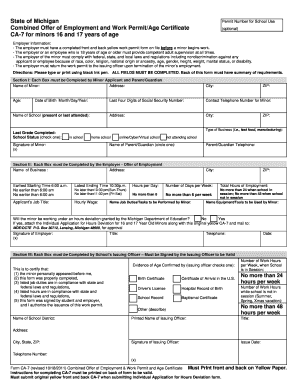
- In Section I, enter the information for the minor applicant. Complete the boxes for the minor's name, address, age, date of birth, school name, and contact details. Make sure to provide the last four digits of the minor's Social Security Number and signature.
- Next, proceed to Section II, where the employer will fill out their information. This includes the name and address of the business, type of business, contact information for the parent or guardian, and details about the hours and job duties for the minor.
- Once Section II is completed, the employer must sign and date the form. Ensure that all information provided regarding the nature of the work and the hours complies with the relevant laws and regulations.
- Section III must be filled by the school's issuing officer. The officer will verify the age of the minor and confirm compliance with state and federal regulations. They will need to check evidence of age and sign the form.
- After completing all sections, ensure to save any changes made. Users can download, print, or share the completed Work Permit form as needed.
Start the process of completing your Work Permit form online today!
Work permits can be obtained from the state of Michigan school issuing officer (the chief administrator of a school district, intermediate school district, etc.) of the school the minor attends or the school district where the minor will be employed.