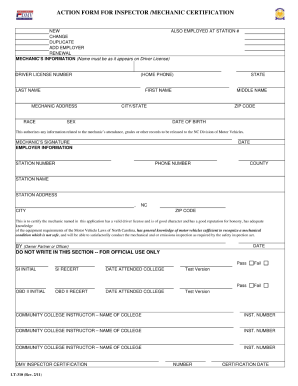
ACTION FORM FOR INSPECTOR /MECHANIC CERTIFICATION NEW ALSO EMPLOYED AT STATION # CHANGE DUPLICATE ADD EMPLOYER RENEWAL MECHANIC'S INFORMATION (Name must be as it appears on Driver License) DRIVER.
Open form follow the instructions
Easily sign the form with your finger
Send filled & signed form or save
How to fill out the NC LT-310 online
Filling out the NC LT-310 form online is essential for managing legal documentation efficiently. This guide provides step-by-step instructions to help you navigate through each section with ease.
Follow the steps to successfully complete the NC LT-310 form online.
- Click 'Get Form' button to obtain the form and open it in your chosen editor.
- Begin with section one, which typically asks for basic information. Enter your full name, address, and contact information clearly, ensuring accuracy to avoid delays.
- In section two, describe the nature of your application. Use precise language to outline the purpose of the form and any relevant details that will aid in processing your submission.
- Proceed to section three, where you may need to provide additional documentation. Attach necessary files or references that support your application.
- Review all provided information in the previous sections to ensure completeness and correctness. Make any adjustments as necessary before finalizing the form.
- Once you have completed the form, you can save changes. Choose to download, print, or share the completed NC LT-310 form according to your requirements.
Take the next step in your process by filling out the NC LT-310 online today!
Experience a faster way to fill out and sign forms on the web. Access the most extensive library of templates available.
Related content
(1) The level and seriousness of the crime. (2) The date of the crime. (3) The age of the...
Trademarks used in this text: Dell, the DELL logo and Dell ScanCenter are trademarks of...
Get answers to your most pressing questions about US Legal Forms API.
What are the requirements for a tag in North Carolina?
In North Carolina, to get a vehicle tag, you need a valid driver’s license, proof of insurance, and a successful vehicle inspection unless you qualify for a waiver like the NC LT-310. Additionally, you must provide the vehicle's title or proof of ownership. Ensuring you have all these documents ready will help facilitate a smooth tagging process.
How do I get a waiver for inspection in NC?
To secure a waiver for inspection in NC, start by gathering evidence of your situation, such as proof of financial difficulty or necessary repair costs. Next, fill out the NC LT-310 waiver application accurately and submit it to the DMV. Platforms like US Legal Forms can assist you with templates and instructions to aid your waiver request.
What is needed for an NC auto inspection?
For an NC auto inspection, you need to provide your vehicle, proof of ownership, and often the prior inspection receipt, if applicable. Emissions testing may also be required depending on your vehicle's age and location. Familiarizing yourself with the NC LT-310 requirements can help ensure you have everything ready for a smooth inspection.
Do I need an inspection to get tags in NC?
Typically, an inspection is required to obtain vehicle tags in North Carolina. However, if your vehicle qualifies for an exemption under the NC LT-310 waiver, you may not need one. Be sure to check the latest guidelines from the North Carolina DMV, and consider using US Legal Forms for assistance in understanding your options.
How to get a waiver for car inspection in NC?
You can obtain a waiver for car inspection in NC under certain conditions, like financial hardship or if your vehicle fails inspection. It's essential to fill out the appropriate forms, such as the NC LT-310, to request the waiver formally. Resources like US Legal Forms can provide you with the necessary documentation and steps to ensure you're properly submitting your request.
Can I get a tag without an inspection in NC?
In North Carolina, you generally need a proper inspection to obtain a vehicle tag. However, if your vehicle qualifies for an NC LT-310 waiver, you may be able to get a tag without the typical inspection. To explore this option, it’s best to check with the North Carolina Department of Motor Vehicles or visit platforms like US Legal Forms for guidance on how to navigate the process.
What is included in an NC car inspection?
An NC car inspection includes a thorough evaluation of essential safety components, such as the braking system, lights, and tires. Additionally, mechanics check for proper emissions control, ensuring compliance with environmental standards. Understanding the specifics of what is included in the inspection can help you prepare your vehicle and avoid surprises, especially when dealing with the NC LT-310 guidelines.
What is the penalty for late inspection in NC?
In North Carolina, failing to have your vehicle inspected by the due date can result in fines. The consequences may include receiving a citation that incurs financial penalties. To avoid any complications, it’s advisable to keep track of your inspection schedules, especially when dealing with requirements like those in the NC LT-310.
What will fail an NC inspection?
Several factors can lead to a failure in an NC inspection. Common failures include issues with brakes, lights, and exhaust systems, as well as missing or poorly functioning safety features. Additionally, vehicles that do not meet emissions standards, which can be outlined in the NC LT-310 guidelines, will not pass inspection.
What all do they check during an inspection?
During an NC inspection, officials check various crucial components of your vehicle, including the steering, suspension, and exhaust systems. They also examine lights, signals, and windshield wipers to ensure everything operates correctly. This thorough assessment guarantees that your vehicle adheres to North Carolina's safety standards, including the requirements outlined in the NC LT-310.
Use professional pre-built templates to fill in and sign documents online faster. Get access to thousands of forms.
If you believe that this page should be taken down, please follow our DMCA take down process here.
This form is available in several versions. Select the version you need from the drop-down list below.