Loading
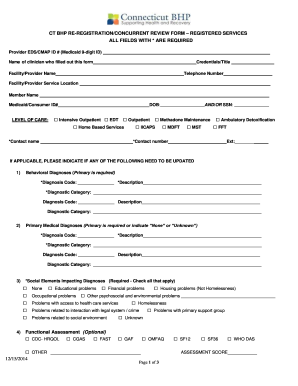
Get Ct Bhp Re-registration/concurrent Review Form ...
How it works
-

Open form follow the instructions
-

Easily sign the form with your finger
-

Send filled & signed form or save
How to fill out the CT BHP re-registration/concurrent review form online
Completing the CT BHP re-registration/concurrent review form online is a crucial step in securing necessary services for individuals. This guide provides straightforward instructions to help users navigate through the sections of the form with ease and clarity.
Follow the steps to effectively fill out the form online.
- Press the ‘Get Form’ button to access the form and open it in your preferred editing tool.
- Start by entering the provider EDS/CMAP ID number, which is a 9-digit Medicaid ID, to identify the provider.
- Fill in the name of the clinician who completed the form, along with their credentials and title.
- Provide the facility or provider name and the contact telephone number, ensuring that the service location is specified.
- Enter the member's name and Medicaid/consumer ID number, followed by their date of birth (DOB).
- Select the appropriate level of care by checking the relevant box, which may include Intensive Outpatient, Outpatient, or Home Based Services.
- Complete the contact information fields, including contact name and phone number, ensuring accuracy.
- If applicable, update any necessary behavioral diagnoses by entering the diagnosis code, description, and diagnostic category.
- Repeat the previous step for primary medical diagnoses, ensuring at least one primary diagnosis is indicated.
- Identify any social elements impacting diagnoses by checking all that apply, including financial or educational problems.
- Complete the functional assessment section if desired, by selecting the appropriate scales.
- Assess current risks to the member by checking the severity levels for risks to self and others.
- Indicate current impairments across various categories by rating each on a scale of 0 to 3.
- Confirm if the member has co-occurring mental health and substance abuse conditions.
- Indicate the degree of progress from the previous registration, choosing from the provided options.
- Specify treatment modalities that will be used with this request, checking yes or no, and detailing the frequency of each type of treatment.
- Complete the federal reporting requirements for members ages 0-18 where applicable, providing information on living situation and any legal issues.
- Describe any additional details for the re-authorization request, including the rationale for continuation, ensuring to keep it within the character limit.
- Once all sections are completed, review the form for accuracy and clarity, then proceed to save the changes, and share or print the document as needed.
Begin filling out the CT BHP re-registration/concurrent review form online to ensure timely access to essential services.