Loading
Get Delta Dental Fillable Enrollment Form
How it works
-

Open form follow the instructions
-

Easily sign the form with your finger
-

Send filled & signed form or save
How to fill out the Delta Dental fillable enrollment form online
Filling out the Delta Dental fillable enrollment form online can be a straightforward process if you follow the correct steps. This guide will walk you through each section of the form, ensuring you provide all necessary information for your dental and vision coverage.
Follow the steps to complete your enrollment form effectively.
- Click ‘Get Form’ button to obtain the form and open it in your selected editing tool.
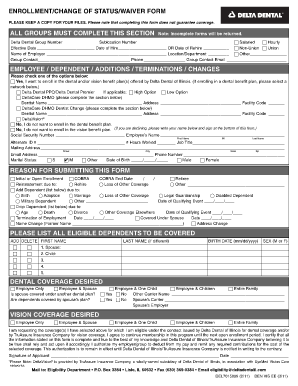
- Begin by filling out the group information section. Enter the Delta Dental group number and sublocation number. Make sure to choose the appropriate employment classification (salaried or hourly), entering relevant dates such as your effective date and date of hire or rehire.
- In the employee, dependent, additions, terminations, or changes section, check the appropriate box if you wish to enroll in the dental and/or vision benefit plans. If you are enrolling in dental coverage, select the applicable network and plan options.
- State the reason for submitting the form by selecting the relevant option (e.g., initial enrollment, COBRA status, or adding a dependent). Fill in dates where prompted, such as for qualifying events.
- List all eligible dependents you wish to cover, specifying their first names, last names (if different), sexes, and birth dates.
- Read and understand the authorization statement at the end of the form before signing. Confirm that all information provided is accurate and true to the best of your knowledge.
Complete your forms online today to ensure timely processing of your enrollment!
If you prefer to write Delta Dental with your question(s), you can do so via email to customer.care@deltadentalma.com or by mail: 465 Medford Street, Boston MA 02129.