Loading
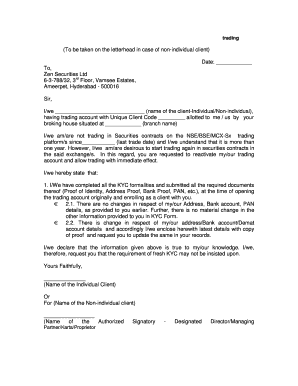
Get Trading Letter Format For Inactive Account - Zenmoney
How it works
-

Open form follow the instructions
-

Easily sign the form with your finger
-

Send filled & signed form or save
How to fill out the Trading Letter Format For Inactive Account - Zenmoney online
This guide provides clear instructions on how to accurately fill out the Trading Letter Format For Inactive Account with Zenmoney. By following the steps outlined below, you can ensure a smooth and effective submission process.
Follow the steps to complete the Trading Letter Format for an inactive account.
- Locate and press the ‘Get Form’ button to access the Trading Letter format. This will open the document for you to fill out online.
- Begin by entering the current date at the top of the form. This is important as it indicates when the request is being made.
- In the address section, fill in the company name, 'Zen Securities Ltd,' followed by the address: '6-3-788/32, 3rd Floor, Vamsee Estates, Ameerpet, Hyderabad - 500016.'
- In the greeting line, address the letter to the appropriate recipient at Zen Securities Ltd.
- Next, in the designated field, input your name (or the name of the non-individual client) as the client requesting the reactivation.
- Provide your Unique Client Code in the specified area, ensuring that this information is accurate.
- State the name of the branch where your trading account is located in the appropriate field.
- Indicate the date of your last trade under the section regarding inactivity to confirm it has been over one year since your last transaction.
- Express your intent to reactivate the trading account, making it clear that you wish to begin trading again.
- In the KYC declaration section, confirm you have completed all necessary KYC formalities and list the documents you initially submitted.
- Specify whether there have been any changes to your personal information as required — either stating there are no changes or providing updated details if applicable.
- Include your declaration that the information provided is true to your knowledge.
- Finally, sign the letter where indicated, and if applicable, mention the designation of the signing individual in the case of a non-individual client.
- After completing the form, save your changes. You may then download, print, or share it as needed.
Ensure your trading account is ready to reactivate by completing the necessary documents online.
Industry-leading security and compliance
US Legal Forms protects your data by complying with industry-specific security standards.
-
In businnes since 199725+ years providing professional legal documents.
-
Accredited businessGuarantees that a business meets BBB accreditation standards in the US and Canada.
-
Secured by BraintreeValidated Level 1 PCI DSS compliant payment gateway that accepts most major credit and debit card brands from across the globe.