Loading
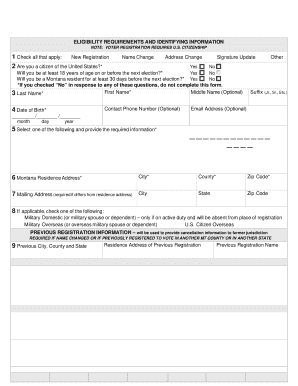
Get Mt Voter Registration Application 2020-2026
How it works
-

Open form follow the instructions
-

Easily sign the form with your finger
-

Send filled & signed form or save
How to fill out the MT Voter Registration Application online
Registering to vote is a vital civic duty, and completing the Montana Voter Registration Application online makes this process accessible and straightforward. This guide provides clear, step-by-step instructions to help users fill out the application effectively.
Follow the steps to complete your application smoothly.
- Click the ‘Get Form’ button to access the MT Voter Registration Application electronically.
- Provide your eligibility information. Check all that apply regarding your registration status: New Registration, Name Change, Address Change, or Signature Update.
- Confirm your U.S. citizenship by selecting 'Yes' or 'No'. You must affirm that you are a true citizen to proceed.
- Indicate whether you will be at least 18 years of age on or before the next election. Only those answering 'Yes' should continue.
- Indicate your residency in Montana by selecting 'Yes' or 'No'. A 'No' answer will disqualify this application from being processed.
- Enter your first name, middle name (optional), last name, and the required contact information.
- Provide your date of birth using the designated fields.
- Select how you will provide identification. Choose from having a Montana Driver's License or ID, last four digits of your Social Security Number, or indicate an attached photo ID.
- Fill in your Montana residence address, including city, county, and zip code.
- If your mailing address differs from your residence, provide the mailing address information in the designated fields.
- If applicable, check the appropriate military or overseas voter option that applies to you.
- If you have previously registered to vote under a different name or in another county or state, provide that information in the previous registration section.
- Decide if you would like to request an absentee ballot and provide any seasonal mailing address information if necessary.
- Read the applicant affirmation statement. Ensure you understand the penalties for providing false information.
- Sign and date the application at the designated fields before submitting it.
- After completing the form, you can save changes, download the application, print it, or share it as needed.
Complete your MT Voter Registration Application online today to ensure your voice is heard in the upcoming elections.