Loading
Get Ks Cf 51-01 2015-2026
How it works
-

Open form follow the instructions
-

Easily sign the form with your finger
-

Send filled & signed form or save
How to fill out the KS CF 51-01 online
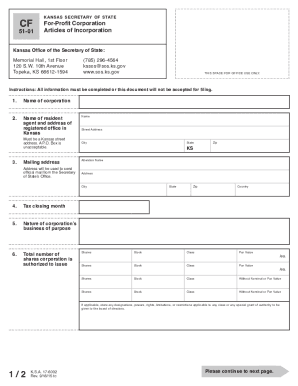
The KS CF 51-01 form is essential for filing Articles of Incorporation for a for-profit corporation in Kansas. This guide provides a clear, step-by-step approach to completing the form online, ensuring that all required information is accurately provided.
Follow the steps to successfully complete the form online.
- Click the ‘Get Form’ button to access the form and open it in your editor.
- Provide the name of the corporation. Ensure the name includes a word of incorporation as mandated by K.S.A. 17-6002.
- Enter the name of the resident agent and the registered office address in Kansas, noting that a street address is required and a P.O. Box is unacceptable.
- Fill in the mailing address where you wish to receive official correspondence from the Secretary of State’s Office.
- Specify the tax closing month for your corporation.
- Describe the nature of the corporation's business or purpose.
- Indicate the total number of shares your corporation is authorized to issue, providing details on stock class and par value where applicable.
- List the name and mailing address of each incorporator, ensuring no fields are left blank.
- Provide the names and addresses of each member of the board of directors if required.
- Specify the duration of the corporation, along with the effective date of the corporation, ensuring it is within 90 days of filing.
- Include signatures of the incorporators, which must match those listed previously, and specify the date of signing.
- Review the form to ensure all sections are completed correctly before submitting.
- Once completed, you can save changes, download the form, print it, or share it as necessary.
Complete your KS CF 51-01 form online today for a seamless filing experience.