Loading
Get Mn Prime Contractor Subcontractor's Statement Of Compliance 2013-2026
How it works
-

Open form follow the instructions
-

Easily sign the form with your finger
-

Send filled & signed form or save
How to fill out the MN Prime Contractor Subcontractor's Statement Of Compliance online
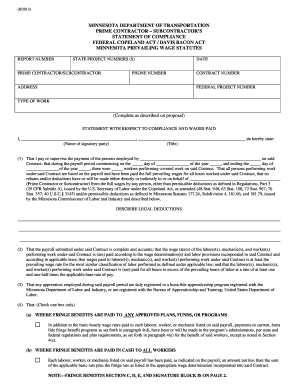
This guide provides a step-by-step approach to completing the MN Prime Contractor Subcontractor's Statement Of Compliance online. This form ensures compliance with federal and state labor laws regarding wage payments and worker benefits.
Follow the steps to complete the form accurately and efficiently.
- Press the ‘Get Form’ button to access the form and open it in your browser.
- Begin by entering the report number at the top of the form.
- Input the state project numbers relevant to your contract.
- Provide the name of the prime contractor or subcontractor in the designated field.
- Fill in the date of completion, including the month, day, and year.
- Enter your contact phone number for any questions related to this form.
- Document the relevant contract number associated with this compliance statement.
- Include the address of the prime contractor or subcontractor.
- If applicable, fill in the federal project number.
- Specify the type of work completed as described in the project proposal.
- In the statement section, write your name and title as the signatory party.
- Indicate the payroll period dates for which this statement applies.
- List the number of workers performing covered work during this payroll period.
- Confirm that all workers are included in the payroll and have received full prevailing wages as required.
- Detail any specific legal deductions that are permissible.
- Accurately report on the payroll submitted, ensuring it aligns with wage determinations.
- If applicable, check the appropriate box regarding how fringe benefits are addressed.
- Complete the required information regarding benefit programs if fringe benefits are provided.
- Provide the name, address, and telephone number for the benefit program's administrator.
- Sign and date the form in both the contractor’s representative and prime contractor sections to verify accuracy.
- Finally, save your changes, download the completed form, print it for your records, or share it as needed.
Complete your documents online today for a streamlined compliance process.