Loading
Get Ak Dhcs Member Appointment No-show Report 2019
How it works
-

Open form follow the instructions
-

Easily sign the form with your finger
-

Send filled & signed form or save
How to fill out the AK DHCS Member Appointment No-Show Report online
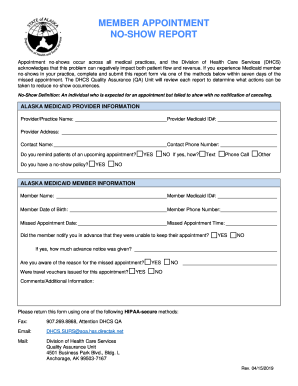
The AK DHCS Member Appointment No-Show Report is an important document that enables medical practices to report instances of no-shows by Medicaid members. Completing this report accurately helps the Division of Health Care Services understand and address no-show occurrences effectively.
Follow the steps to fill out the AK DHCS Member Appointment No-Show Report online
- Click ‘Get Form’ button to obtain the form and open it in the editor.
- Enter the provider information in the designated sections, including the provider/practice name, Medicaid ID, address, contact name, and phone number.
- Indicate whether you remind patients of upcoming appointments by selecting ‘YES’ or ‘NO’. If applicable, specify the method of reminder (e.g., Text, Phone Call, Other).
- Specify if your practice has a no-show policy by selecting ‘YES’ or ‘NO’.
- Fill in the Alaska Medicaid member information, including the member's name, Medicaid ID, date of birth, and phone number.
- Document the missed appointment date and time in the corresponding fields.
- Indicate whether the member notified your practice in advance about their inability to attend the appointment by selecting ‘YES’ or ‘NO’.
- If the member notified your practice, provide details on how much advance notice was given.
- Answer whether you are aware of the reason for the missed appointment by selecting ‘YES’ or ‘NO’, and if applicable, provide the reason.
- Answer whether travel vouchers were issued for the appointment by selecting ‘YES’ or ‘NO’.
- Use the comments section to provide any additional relevant information or remarks.
- After completing all sections, ensure to save your changes, and download, print, or share the form as necessary.
Complete the AK DHCS Member Appointment No-Show Report online to help manage no-shows effectively.