Loading
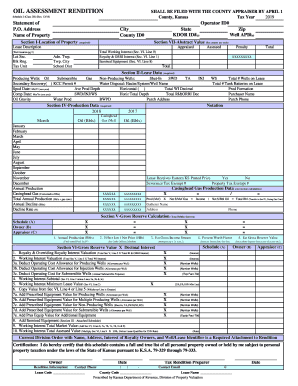
Get Ks Oil Assessment Rendition Schedule 2 (class 2b) 2018
How it works
-

Open form follow the instructions
-

Easily sign the form with your finger
-

Send filled & signed form or save
How to fill out the KS Oil Assessment Rendition Schedule 2 (Class 2B) online
This guide provides clear and step-by-step instructions for users on how to fill out the KS Oil Assessment Rendition Schedule 2 (Class 2B) online. Following these guidelines will ensure your submission is accurate and complete.
Follow the steps to successfully complete the form
- Press the ‘Get Form’ button to access the KS Oil Assessment Rendition Schedule 2 (Class 2B) and open it in your preferred editor.
- In the 'Statement of Name of Property' section, enter your name or the name of the property being assessed, as well as your 'Operator ID#', 'KDOR ID#(s)', and 'County ID#' accurately.
- Complete Section I, 'Location of Property'. Fill in the required details including 'City', 'State', 'Zip', and any applicable 'Well API#(s)'.
- Proceed to Section II, 'Lease Data'. Provide information about producing wells, including types of wells and production details. Make sure to include any required data such as 'Spud Date' and 'Ave Prod Depth'.
- Move to Section IV, 'Production Data'. Input monthly production data for each month of the tax year, detailing oil produced and casinghead gas production where applicable.
- In Section V, 'Gross Reserve Calculation', fill out the annual production and net price per barrel to calculate estimated gross income stream and present worth factor.
- Continue to Section VI, where you will determine gross reserve value and working interest. Ensure that you deduct any relevant operating costs.
- Ensure all necessary signatures are collected in the certification section, including the owner's signature and preparer's details. Provide contact information as required.
- Finally, review your completed form for accuracy. You may now save changes, download, print, or share the copy of the form as required.
Start completing your KS Oil Assessment Rendition Schedule 2 (Class 2B) online today to ensure timely submission.
Get form
Experience a faster way to fill out and sign forms on the web. Access the most extensive library of templates available.
Related links form
Get This Form Now!
Use professional pre-built templates to fill in and sign documents online faster. Get access to thousands of forms.