Loading
Get Fl 309
How it works
-

Open form follow the instructions
-

Easily sign the form with your finger
-

Send filled & signed form or save
How to fill out the FL 309 online
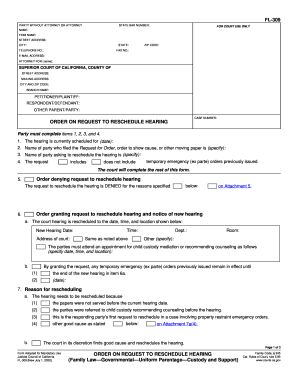
Filling out the FL 309 form online is a crucial step for parties seeking to reschedule a court hearing in family law matters. This guide provides a clear, step-by-step approach to ensure that you complete the form accurately and efficiently.
Follow the steps to successfully complete the FL 309 form online.
- Click ‘Get Form’ button to access the FL 309 form and open it in your digital editor.
- Fill in the section labeled 'Party without attorney or attorney for court use only' by entering your name, firm name (if applicable), street address, city, state, telephone number, zip code, fax number, and email address. If you are representing yourself, simply state 'N/A' for the attorney section.
- In the 'Superior Court of California, County of' section, enter the street address, mailing address, city and zip code, and branch name of the court handling your case.
- Provide the names of the petitioner/plaintiff, respondent/defendant, and other parent/party involved in the case, along with the case number assigned by the court.
- Complete items 1 to 4 under the 'Order on Request to Reschedule Hearing' section, which requires entering the current hearing date, the name of the party who filed the request, and the name of the party asking to reschedule.
- Indicate whether your request includes temporary emergency orders by selecting the appropriate option.
- If applicable, complete the sections outlining the reasons for requesting a reschedule, detailing any good cause as necessary.
- Review any modifications or terminations to temporary emergency orders, ensuring all necessary details are documented for the court.
- Specify how the order will be served, including any necessary documents that must accompany the FL 309 form for proper service.
- After completing the form, you can save changes, download it for your records, print, or share the form as required.
Get started now and complete your FL 309 form online for a smooth filing process.
Notice of Entry of Judgment (Uniform Parentage—Custody and Support) (FL-190) Lists the type of judgment that the court made (granted), like divorce, legal separation, or annulment. It also states the date that your legal relationship changed and the date that the court entered the judgment. Get form FL-190.