Loading
Get Rapid Pass
How it works
-

Open form follow the instructions
-

Easily sign the form with your finger
-

Send filled & signed form or save
How to fill out the RAPID PASS online
This guide provides clear and detailed instructions on how to successfully fill out the RAPID PASS online. Whether you are an individual or representing a vehicle, this comprehensive overview will ensure you complete the form accurately and efficiently.
Follow the steps to fill out the RAPID PASS efficiently.
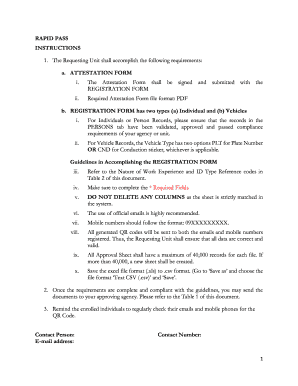
- Press the ‘Get Form’ button to obtain the RAPID PASS form and open it for editing.
- Complete the attestation form, ensuring it is signed and prepared for submission alongside the registration form.
- Select the appropriate registration form type: for individual records or vehicle records. For vehicle records, choose between 'PLT' for plate number or 'CND' for conduction sticker, as applicable.
- For individual records, validate and ensure that the information in the PERSONS tab meets the compliance requirements set by your agency.
- Refer to Table 2 of the document for the nature of work experience and ID type reference codes to aid in completing the registration form.
- Make sure to fill out all required fields denoted on the form, and avoid deleting any columns to maintain the integrity of the data.
- Use official email addresses when providing contact information, and ensure mobile numbers follow the format: 09XXXXXXXXX.
- Double-check that all entered data is accurate, as generated QR codes will be sent to registered emails and mobile numbers.
- Be aware that each approval sheet can accommodate a maximum of 40,000 records; if exceeding this limit, create a new file.
- Save the completed form as an Excel file (.xls) and then convert it to .csv format by selecting 'Save as' and choosing 'Text CSV (.csv)'.
- Once the RAPID PASS is fully prepared and compliant with guidelines, submit the documents to your approving agency as indicated in Table 1 of the document.
- Remind enrolled individuals to frequently check their registered emails and mobile phones for the QR code.
Get started on completing your RAPID PASS online and ensure all requirements are met.
Related links form
Don't smoke or drink alcoholic beverages before donating. Smoking can impair the blood's ability to carry oxygen, so if you find yourself unable to kick the habit, at least resist the urge to light one up two hours before donating blood.