Loading
Get Branch Code / Kod Caw
How it works
-

Open form follow the instructions
-

Easily sign the form with your finger
-

Send filled & signed form or save
How to fill out the Branch Code / Kod Caw online
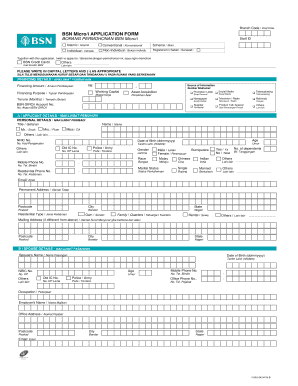
This guide provides a comprehensive walkthrough on how to successfully complete the Branch Code / Kod Caw application form online. By following the steps outlined below, users can ensure they fill out the form accurately and efficiently.
Follow the steps to fill out the Branch Code / Kod Caw application form online.
- Click the ‘Get Form’ button to access the application form and open it in your designated editor.
- Begin by entering your staff ID in the designated field if applicable.
- Select whether you prefer Islamic or Conventional financing by marking the appropriate option.
- Choose your scheme type, indicating if you are an individual or non-individual. Mark the suitable choice.
- Indicate if you are registered in Sabah or Sarawak by selecting the relevant option.
- Fill out the financing details section by specifying the financing amount and purpose of financing.
- In the applicant details section, provide your personal information, including title, name, date of birth, NRIC number, and contact information.
- Complete the spouse details section if applicable, providing their name, date of birth, and contact information.
- If you have a business, provide the company’s name, business registration number, and other relevant business information.
- Fill out the existing financing information update section if you have any current financing with BSN.
- Complete the referee details section, providing information for contacts that can vouch for your application.
- Provide details for any guarantors, including their title, name, and relationship to you.
- Review all details entered in the form for accuracy before proceeding.
- Final step: Save your changes, and choose to download, print, or share the completed form as needed.
Start filling out your Branch Code / Kod Caw application form online today!