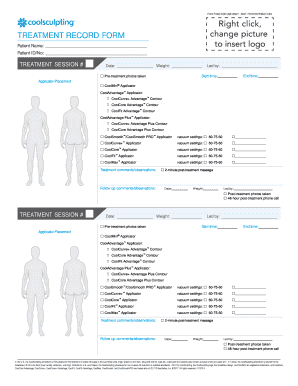
FOR PRACTICE USE ONLY NOT FOR DISTRIBUTIONTREATMENT RECORD FORM Patient Name: Patient ID/No:TREATMENT SESSION #Date:Weight: Pretreatment photos takenLed by: Start time:End time:Applicator Placement.

How it works
  • Open form

    Open form follow the instructions

  • Easily sign form

    Easily sign the form with your finger

  • Share form

    Send filled & signed form or save

How to fill out the TREATMENT RECORD FORM online

This guide provides detailed instructions for completing the Treatment Record Form online. Whether you are a healthcare professional or a person involved in the treatment process, this step-by-step guide will ensure that you fill out the form accurately and efficiently.

Follow the steps to complete the form online:

  1. Click the ‘Get Form’ button to obtain the form and open it in your preferred online editor.
  2. Begin filling in the 'Patient Name' and 'Patient ID/No' sections with the appropriate information for the individual receiving treatment.
  3. For each treatment session, enter the 'Treatment Session #' and the 'Date' of the session.
  4. Record the 'Weight' of the patient at the time of treatment.
  5. Indicate whether 'Pre-treatment photos were taken' by checking the appropriate box.
  6. Fill in the 'Led by' section with the name of the practitioner leading the session, and note the 'Start time' and 'End time' of the treatment.
  7. Select the 'Applicator Placement' used during the treatment by checking the corresponding box. If applicable, detail the specific contour used for CoolAdvantage™ and CoolAdvantage Plus™ Applicators.
  8. Document the vacuum settings applied during the treatment. You will find a checkbox for vacuum settings, select accordingly.
  9. Note whether a '2-minute post-treatment massage' was conducted by ticking the box.
  10. Fill in the 'Treatment comments/observations' section with any relevant details regarding the treatment session.
  11. Record any 'Follow up comments/observations' and note the current 'Date' and 'Weight', as necessary.
  12. Check if 'Post-treatment photos were taken' and if a '48-hour post-treatment phone call' was made by marking the respective boxes.
  13. Once all relevant fields are completed and verified, you can save your changes, download, print, or share the form as needed.

Complete your documents online today for a streamlined management experience.

Get form

Experience a faster way to fill out and sign forms on the web. Access the most extensive library of templates available.

Related content

Medical Treatment Records | National Archives

Sep 17, 2020 — Clinical and medical treatment records that were retired to NPRC prior to...

Learn more
Authorization for Release of Health Information...

... request that health information regarding my care and treatment be released as set...

Learn more
PRAEGNANT Study: Home PRAEGNANT

... to record treatment-induced toxicities and patient´s quality of life in routine...

Learn more
Questions & Answers

Get answers to your most pressing questions about US Legal Forms API.

Contact support

What is the creation of a record detailing medical treatment?

Clinical documentation (CD) is the creation of a digital or analog record detailing a medical treatment, medical trial or clinical test. Clinical documents must be accurate, timely and reflect specific services provided to a patient.

Creating a PHR Contact your healthcare provider's office or the health information management or medical records staff at any hospital or facility where you received treatment and ask for an "authorization for the release of information" form. Complete the form and return it, as directed.

SCRs can be viewed through clinical systems or through the Summary Care Record application (SCRa) on the Spine web portal, or the National Care Records Service from a machine logged in to the secure NHS network, using a smartcard with the appropriate Role Based Access Control codes set.

Treatment record means the record in which clinical information relating to the provision of physical, social and mental services is recorded and stored either electronically or on paper.

MRN (Medical Records Number) = general patient identifier used for locating a patient. Tracking ID (Barcode Number) = an identifier of a specific case note volume / media.

A medical record is a history of someone's health. Most hospitals and doctor's offices use electronic health records (EHRs, also called electronic medical records or EMRs). An EHR is a computerized collection of a patient's health records.

Medical records are the document that explains all detail about the patient's history, clinical findings, diagnostic test results, pre and postoperative care, patient's progress and medication. If written correctly, notes will support the doctor about the correctness of treatment.

No. Under General Data Protection Regulation (GDPR) accessing your medical records is free.

Get This Form Now!

Use professional pre-built templates to fill in and sign documents online faster. Get access to thousands of forms.

If you believe that this page should be taken down, please follow our DMCA take down process here.

Get TREATMENT RECORD FORM