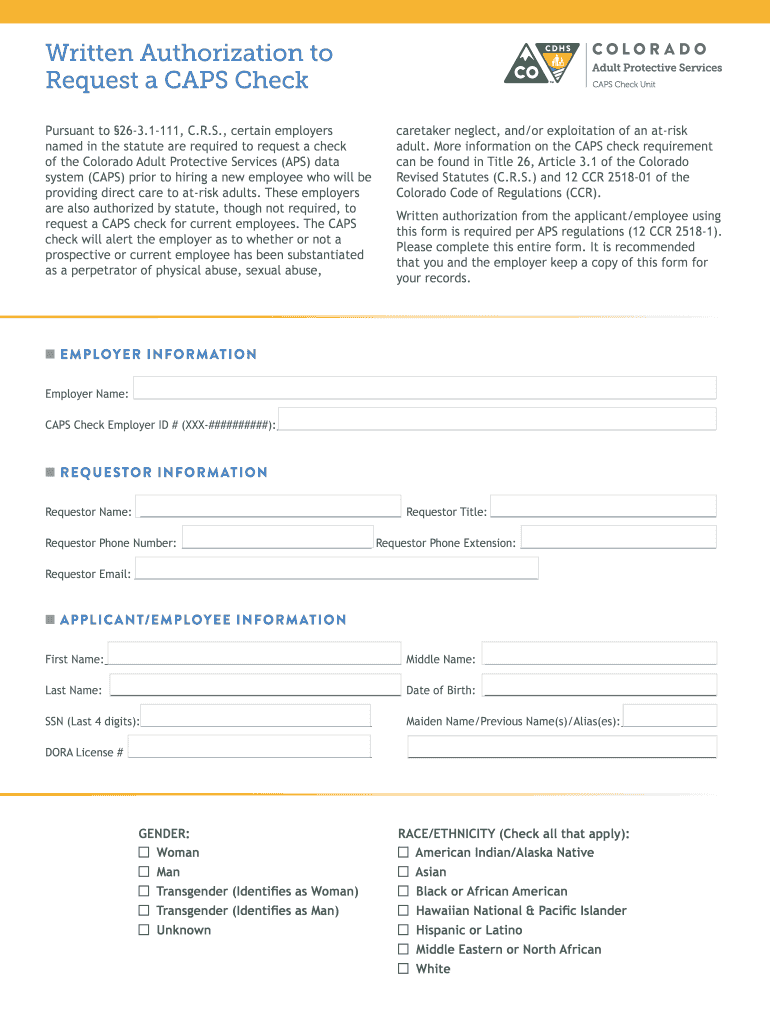
Written Authorization to Request a CAPS Check Pursuant to 263.1111, C.R.S., certain employers named in the statute are required to request a check of the Colorado Adult Protective Services (APS) data system.

Open form follow the instructions

Easily sign the form with your finger

Send filled & signed form or save
How to fill out the Colorado Caps Form online
Completing the Colorado Caps Form online is an important step for employers to ensure the safety and well-being of at-risk adults. This guide provides a clear, step-by-step approach to help you navigate the form efficiently, whether you have prior experience or are new to this process.
Follow the steps to effectively complete the Colorado Caps Form online.
- Click 'Get Form' button to obtain the form and access it in the editor.
- Fill in the employer information section. Enter the employer name and the CAPS check employer ID number as required.
- In the requestor information section, provide your name, title, phone number, phone extension, and email address accurately.
- Complete the applicant/employee information section. Include the first name, middle name, last name, date of birth, and the last four digits of the social security number. If applicable, also enter any maiden names or aliases.
- Indicate the applicant's gender by selecting one of the options provided: Woman, Man, Transgender (Identifies as Woman), Transgender (Identifies as Man), or Unknown.
- In the race/ethnicity section, check all categories that apply to the applicant.
- Fill out the contact information, including home phone, mobile phone, work phone, and their respective extensions, as well as home and work email addresses.
- Provide the current address, including street, city, state, and zip code, along with the start date of residence.
- If the applicant has lived at their current address for less than five years, list all previous addresses with corresponding start and end dates.
- Detail any previous employers by listing agency names in the designated space provided.
- Affirm the accuracy of the information by signing and dating where indicated, authorizing the CAPS check to be requested.
- Finally, you can choose to save your changes, download the filled form, print it for your records, or share it as necessary.
Start filling out the Colorado Caps Form online today to ensure compliance and protect at-risk adults.
Experience a faster way to fill out and sign forms on the web. Access the most extensive library of templates available.
Related content
system (CAPS) prior to hiring a new employee who will be providing direct care ... this...
... please call CAPS at 303.492.2277 and ask to be transferred to the clinician line. If...
2005 Chevrolet Colorado Owner Manual M ... name COLORADO are registered trademarks of...
Get answers to your most pressing questions about US Legal Forms API.
How long does a caps check take in Colorado?
Please use Chrome, Firefox or Safari as your browser. The CAPS Check Unit will return results within five business days. CAPS Checks will not be performed on state-observed holidays. Please note: Per the Colorado Code of Regulations, 12 CCR 2518-1, Volume 30.960.
What states have no cap?
In addition, four state constitutions prohibit damages caps in wrongful death claims: New York, Ohio, Oklahoma, and Utah.
What is the death cap in Colorado?
The cap is $250,000, adjusted for inflation. However, if there is clear and convincing evidence that a higher amount is appropriate, the limit may be raised. If the case is a medical malpractice case, separate laws apply that impose different limits periodically adjusted for inflation.
Does Colorado have a cap on punitive damages?
There is a cap on punitive damages in Colorado. The award cannot exceed the amount of “actual damages.” For example, if a plaintiff is awarded $100,000 in compensatory damages, then he/she can recover up to an additional $100,000 in punitive damages.
What is Colorado caps form?
It is a check of the Colorado Adult Protective Services data system (CAPS) to determine whether an individual has been substantiated of physical abuse, sexual abuse, caretaker neglect, exploitation, or a harmful act. A CAPS check does NOT replace any other requirements for background checks that apply to your agency.
Does Colorado have a cap on damages?
There is no cap on economic damages in Colorado. This means there is no ceiling on losses resulting from quantifiable, out-of-pocket costs like medical bills, lost wages, and property damage.
Does Colorado have a cap?
Colorado Damage Caps for Personal Injury Claims If there is convincing evidence that an increase is justified, you can be awarded up to $936,030. Pain and suffering in medical malpractice claims are subject to a different damage cap.
Use professional pre-built templates to fill in and sign documents online faster. Get access to thousands of forms.
If you believe that this page should be taken down, please follow our DMCA take down process here.