Loading
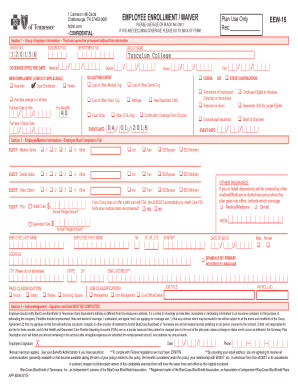
Get Employee Enrollment / Waiver Eew-15 Please Use Blue Or ...
How it works
-

Open form follow the instructions
-

Easily sign the form with your finger
-

Send filled & signed form or save
How to fill out the EMPLOYEE ENROLLMENT / WAIVER EEW-15 online
This guide provides a clear and supportive approach to filling out the EMPLOYEE ENROLLMENT / WAIVER EEW-15 form online. It offers step-by-step instructions to ensure that users can complete the form accurately and efficiently.
Follow the steps to complete the EMPLOYEE ENROLLMENT / WAIVER EEW-15 form.
- Click ‘Get Form’ button to obtain the form and open it in your preferred online editor.
- In Section 1, enter the group/employer information. This includes the GROUP NO., SUBGROUP NO., DEPARTMENT NO., and GROUP NAME. Ensure all fields are filled out completely as this information is vital for processing.
- Indicate your coverage effective date and check any applicable options for new enrollment such as New Hire, Open Enrollment, or Rehire. If applicable, select your qualifying event from the provided options.
- In Section 2, you must complete your employee/member information in full. Specify your medical, dental, vision, and FSA options by marking the appropriate boxes. Remember to include your annual pledge amount.
- Provide information about other insurance coverage if applicable, detailing if you or your dependents have other medical/Medicare or dental insurance.
- In Section 3, sign and date the form to acknowledge that all information provided is accurate. Your signature authorizes the release of medical records and indicates understanding of your coverage responsibilities.
- In Section 4, fill in dependent information. For each person to be covered, include their last name, first name, date of birth, and relationship to you.
- Complete Section 5 if applicable, where you can elect ancillary insurance options. Fill out beneficiary details as required.
- If you are declining coverage, complete Section 6. Indicate the refusal of coverage options and provide a reason for declining.
- Once all sections are filled out, save your changes, or download the form for printing. Ensure all information is correct and make any necessary adjustments before final submission.
Complete your EMPLOYEE ENROLLMENT / WAIVER EEW-15 form online today for a seamless coverage experience.
Industry-leading security and compliance
US Legal Forms protects your data by complying with industry-specific security standards.
-
In businnes since 199725+ years providing professional legal documents.
-
Accredited businessGuarantees that a business meets BBB accreditation standards in the US and Canada.
-
Secured by BraintreeValidated Level 1 PCI DSS compliant payment gateway that accepts most major credit and debit card brands from across the globe.