Loading
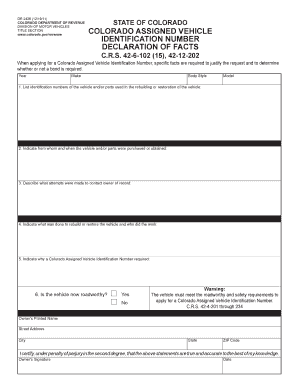
Get Dr 2426. Dr 2426
How it works
-

Open form follow the instructions
-

Easily sign the form with your finger
-

Send filled & signed form or save
How to fill out the DR 2426 online
Filling out the DR 2426 form is a crucial step in obtaining a Colorado Assigned Vehicle Identification Number. This guide will provide you with clear, step-by-step instructions to help you complete the form accurately and efficiently.
Follow the steps to complete the DR 2426 form successfully.
- Click the ‘Get Form’ button to obtain the form and open it in your preferred editor.
- Begin filling out the form by providing the required vehicle details such as the year, make, body style, and model of the vehicle.
- List the identification numbers of the vehicle and/or parts that were used in the rebuilding or restoration process. Ensure that you utilize the space provided for multiple entries.
- Indicate from whom and when you purchased or obtained the vehicle and/or parts. Be as detailed as possible to provide a clear record.
- Describe the attempts made to contact the owner of record. This information is vital for establishing ownership rights.
- Detail the work done to rebuild or restore the vehicle, including who performed the work. This assists in evaluating the legitimacy of your application.
- Explain why a Colorado Assigned Vehicle Identification Number is required for your vehicle. Provide thorough reasoning to support your application.
- Indicate if the vehicle is now roadworthy by selecting 'Yes' or 'No.' Remember, the vehicle must meet safety requirements to proceed.
- Provide your printed name, street address, city, state, and ZIP code in the designated areas.
- Sign and date the form, certifying that the statements made are true and accurate to the best of your knowledge.
- Once you have completed all sections, save your changes, and consider downloading, printing, or sharing the completed form as needed.
Complete your DR 2426 form online today!
For questions regarding your vehicle registration, call the Division of Motor Vehicles at 303.205. 5600 or visit dmv.colorado.gov/vehicles.