Loading
Get Pps General/mh/aoda/noms Downtime Form
How it works
-

Open form follow the instructions
-

Easily sign the form with your finger
-

Send filled & signed form or save
How to fill out the PPS General/MH/AODA/NOMs Downtime Form online
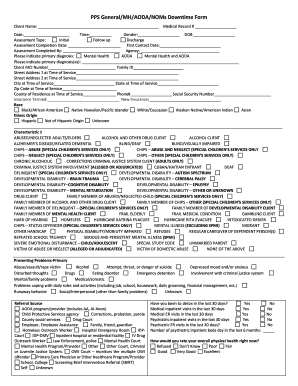
Filling out the PPS General/MH/AODA/NOMs Downtime Form online is an important step in documenting the necessary information for assessing individuals' needs related to mental health and substance use. This guide will walk you through each section of the form to ensure that you provide accurate and complete information.
Follow the steps to successfully complete the form online.
- Press the ‘Get Form’ button to access the form and open it in the online editor. This allows you to begin filling out the necessary fields.
- Start by entering the client name and medical record number in the designated fields.
- Fill in the date and time, along with the client's gender and date of birth.
- Select the assessment type, indicating whether it is an initial assessment, a follow-up, or a discharge.
- Provide the assessment completion date and the date of the first contact.
- Document the name of the person who completed the assessment and the agency they represent.
- Indicate the primary diagnosis by choosing from options like Mental Health, AODA, or both.
- Complete the primary diagnosis details, including client MCI number and family ID.
- Input the street address, city, state, zip code, and county of residence at the time of service.
- Add relevant phone number and social security number, along with insurance information.
- Describe the client's demographic details, selecting race and ethnic origin from provided options.
- Mark any relevant characteristics or presenting problems by checking the appropriate boxes.
- Answer questions regarding detox visits, medical visits, and psychiatric visits within the past 30 days.
- Rate the client's overall physical health, current living arrangements, and employment status.
- Document additional questions on education status, psychosocial stressors, and any active treatment plans.
- Complete sections about health appointments and post-treatment interactions, ensuring all questions are answered.
- Finally, review all entries for accuracy and completeness, and then choose to save your changes, download, print, or share the form as necessary.
Complete the PPS General/MH/AODA/NOMs Downtime Form online today to ensure comprehensive documentation.