Loading
Get Pace Administrative Assistant Application Form - Osba.org
How it works
-

Open form follow the instructions
-

Easily sign the form with your finger
-

Send filled & signed form or save
How to fill out the PACE Administrative Assistant Application Form - Osba.org online
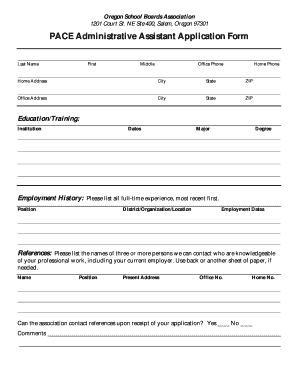
Filling out the PACE Administrative Assistant Application Form requires careful attention to detail. This guide will provide clear and supportive instructions to help you successfully complete the form online.
Follow the steps to complete the application form accurately.
- Click the 'Get Form' button to access the application form and open it in your preferred online editor.
- Begin by entering your last name, first name, and middle initial in the designated fields. Ensure spelling is accurate to avoid any issues in processing your application.
- Provide your contact information, including your office phone and home phone numbers, as well as your home address, city, state, and ZIP code.
- Fill out your office address information, including the same details requested for your home address.
- Under the 'Education/Training' section, list your educational background, including institutions attended, dates of attendance, your major, and any degrees earned.
- In the 'Employment History' section, detail your full-time employment experiences, starting with your most recent job. Include your position, the district or organization where you worked, and the employment dates.
- List three or more references who are familiar with your professional work. Include their names, positions, present addresses, and contact numbers. Indicate whether the association can contact these references upon receipt of your application.
- Read the certification statement carefully before signing. By signing, you confirm that all information provided is accurate. Ensure you also enter the date of your signature.
- If someone else completes the form on your behalf, provide their name and number in the space provided.
- Finalize your application by reviewing all fields for completeness and accuracy. Once satisfied, you can save changes, download a copy, print the form, or share it as instructed.
Start completing your application online today to take the next step in your career!