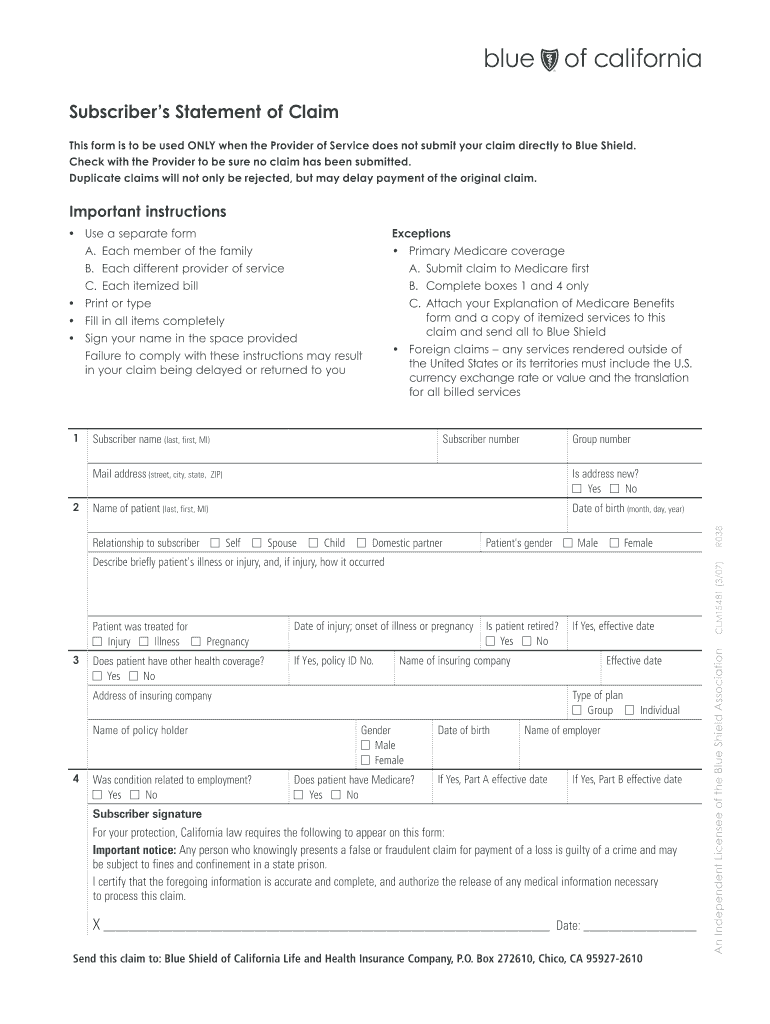
Subscriber s Statement of Claim This form is to be used ONLY when the Provider of Service does not submit your claim directly to Blue Shield. Check with the Provider to be sure no claim has been submitted* Duplicate claims will not only be rejected but may delay payment of the original claim* Important instructions Use a separate form Exceptions A. Each member of the family Primary Medicare coverage B. Each different provider of service A. Submit claim to Medicare first C. Each itemized bill B. Complete boxes 1 and 4 only C. Attach your Explanation of Medicare Benefits form and a copy of itemized services to this claim and send all to Blue Shield Print or type Fill in all items completely Sign your name in the space provided oreign claims any services rendered outside of F the United States or its territories must include the U*S* currency exchange rate or value and the translation for all billed services Failure to comply with these instructions may result in your claim being delaye....
Loading

Open form follow the instructions

Easily sign the form with your finger

Send filled & signed form or save
How to fill out the CA Blue Shield CLM15481 online
The CA Blue Shield CLM15481 form is essential for individuals needing to submit claims when their service provider has not submitted them directly. This guide provides clear, step-by-step instructions to help users complete the form accurately and efficiently.
Follow the steps to fill out the form effectively.
- Click ‘Get Form’ button to obtain the form and open it in the editor.
- Begin by filling out the subscriber’s name in the appropriate field (last name, first name, middle initial). This ensures that the claim is processed under the correct person.
- Provide the mailing address, including street, city, state, and ZIP code, ensuring all details are correct to avoid any delays.
- Enter the subscriber number and group number as indicated on your insurance documentation.
- Indicate if the address is new by selecting ‘yes’ or ‘no’.
- Fill in the patient's name, including last name, first name, and middle initial.
- Specify the patient’s relationship to the subscriber by selecting the appropriate option (e.g., self, spouse, child, domestic partner).
- Input the patient’s date of birth using the format (month, day, year).
- Select the patient’s gender by choosing either ‘male’ or ‘female.’
- Describe briefly the patient’s illness or injury and detail how the injury occurred, if applicable.
- Indicate the date of injury, onset of illness or pregnancy.
- Specify whether the patient has other health coverage by selecting ‘yes’ or ‘no,’ and provide the policy ID number if applicable.
- State whether the patient is retired, choosing ‘yes’ or ‘no.’ If yes, provide the name of the insuring company.
- Enter the effective date and type of plan (group or individual) of the insurance coverage.
- Complete the address of the insuring company and provide the name of the policyholder.
- Answer whether the condition is related to employment by selecting ‘yes’ or ‘no,’ and provide the effective date if applicable.
- If applicable, indicate if the patient has Medicare by selecting ‘yes’ or ‘no,’ along with the date of birth and effective dates for Parts A and B.
- The subscriber must sign and date the form in the provided area to certify that the information is accurate.
- Review the form for completeness, ensuring all required fields are filled out and all necessary documents are attached.
- Save changes, download, print, or share the completed form as needed.
Complete your claim forms online for a smoother processing experience.
Experience a faster way to fill out and sign forms on the web. Access the most extensive library of templates available.
Related content
Overview Blue Shield of CA Provider - Pharmacy Forms Blue … WebLearn more...
... (CLM-15481) Employees should use this form ONLY when the publisher of ... Difference...
Get answers to your most pressing questions about US Legal Forms API.
How to submit a claim in care health insurance?
To submit a claim using CA Blue Shield CLM15481 in care health insurance, start by filling out the claim form accurately. You will need to include all relevant medical records and notices. After ensuring all information is correct and complete, submit your claim through the provided online portal or by mailing it directly. For assistance, the uslegalforms platform can guide you through any complexities you might encounter.
Is the Blue Shield of California the same as the Blue Cross Blue Shield?
Blue Shield of California and Blue Cross Blue Shield are distinct entities, though they are part of the same larger network of health insurance. CA Blue Shield CLM15481 specifically refers to the plans offered by Blue Shield of California. While they may offer similar types of coverage and benefits, it’s important to verify the specifics of your policy and provider.
How do I file a Bcbsnc claim?
Filing a BCBSNC claim can be straightforward if you follow the required steps for CA Blue Shield CLM15481. Begin by completing the claim form with your information and attach necessary documents, including bills and receipts. Once everything is in order, submit your claim through their online system or by mail. For further instructions, consider checking out resources on the uslegalforms platform.
How do I submit an insurance claim form?
To submit an insurance claim form for CA Blue Shield CLM15481, first, fill out the required details accurately on the form. Include supporting documents like bills, diagnosis, and treatment information. After completing the form, you can submit it online through their portal or send a physical copy via mail. If you need a template or assistance, uslegalforms is a useful resource.
What is the downside of filing an insurance claim?
The downside of filing an insurance claim with CA Blue Shield CLM15481 may include potential increases in your premium rates. Claims can also take time to process, which may lead to delays in receiving your reimbursement. Additionally, frequent claims might affect your insurability in the future, so it's crucial to assess your options carefully before proceeding.
How to submit a health insurance claim?
To submit a health insurance claim with CA Blue Shield CLM15481, start by gathering your medical bills and any relevant documents. Next, complete the claim form provided by your insurance provider. You can usually submit the claim electronically through their website or send it through the mail. If you have any questions, consider visiting uslegalforms for comprehensive guidance on this process.
How to submit out of network claims with BCBS?
To submit out-of-network claims with Blue Cross Blue Shield (BCBS) under CA Blue Shield CLM15481, fill out the out-of-network claim form provided on the BCBS website. Include all necessary documentation and receipts. This will help facilitate the reimbursement process, so be meticulous in your submission.
What is the payer ID for Blue Shield of California?
The payer ID for Blue Shield of California, particularly for claims under CA Blue Shield CLM15481, is necessary for efficient processing. You can find this information on the Blue Shield website or by contacting their customer service. Having the correct payer ID ensures your claims are handled swiftly.
How do I submit a reimbursement claim?
To submit a reimbursement claim with CA Blue Shield CLM15481, collect all relevant receipts and documents related to your healthcare expenses. Fill out the reimbursement claim form available on their website, and send it along with your documents. Ensure to keep copies for your records.
How do I get my 1095 B form Blue Shield?
To obtain your 1095 B form from Blue Shield, log in to your member account on the Blue Shield website. You can also request this form via customer service. The 1095 B form is important for tax purposes as it provides proof of health coverage under CA Blue Shield CLM15481.
Use professional pre-built templates to fill in and sign documents online faster. Get access to thousands of forms.
If you believe that this page should be taken down, please follow our DMCA take down process here.