Loading
Get Anthem Outpatient Treatment Report 2015-2026
How it works
-

Open form follow the instructions
-

Easily sign the form with your finger
-

Send filled & signed form or save
How to fill out the Anthem Outpatient Treatment Report online
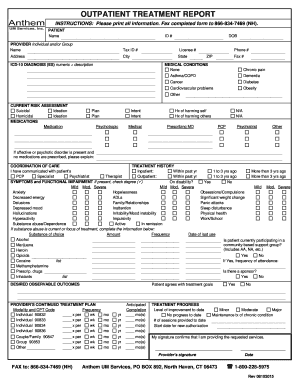
Filling out the Anthem Outpatient Treatment Report online is a straightforward process designed to collect essential information for outpatient treatment. This guide will provide clear instructions for completing each section of the form effectively.
Follow the steps to complete the Anthem Outpatient Treatment Report online
- Press the ‘Get Form’ button to retrieve the Anthem Outpatient Treatment Report and open it in your preferred document editor.
- Begin by entering the patient's information in the designated fields. This includes the full name, ID number, date of birth, and contact details such as phone number and address. Ensure all entries are accurate.
- Next, fill in the provider's information, including the individual or group name, tax ID number, and their licensing details. Again, accuracy is crucial here.
- Identify the primary ICD-10 diagnosis by entering the diagnosis codes alongside the appropriate descriptions in the specified section.
- In the medical conditions section, check the relevant boxes to indicate any chronic conditions the patient may have, such as asthma, diabetes, or cardiovascular issues.
- Conduct a current risk assessment by marking indicators for suicidal or homicidal ideation if applicable.
- Provide a detailed account of any medications currently being used by the patient, including dosage plans and any past history of self-harm or harm to others.
- In the coordination of care section, indicate communication with other providers, noting any inpatient or outpatient treatment history by marking the appropriate timeframes.
- Assess and check the symptoms and functional impairments present for the patient, documenting the degree of their severity.
- Provide details regarding the patient's substance use if applicable, including the type of substance, amount, frequency, and the date of last use.
- Outline the desired observable outcomes, ensuring the patient agrees with the treatment goals set out.
- Fill in the provider’s continued treatment plan, specifying the modality and CPT codes, frequency of sessions, and anticipated completion dates.
- Evaluate and summarize the treatment progress, indicating the level of improvement observed so far.
- Finally, have the provider sign and date the report to confirm that all information provided is accurate and that they are delivering the requested services.
- After all fields are completed, save the changes to the form. You may download, print, or share the filled-out report as needed.
Complete your Anthem Outpatient Treatment Report online today to facilitate efficient care.
To speak to someone at BCBS of Illinois for provider-related inquiries, you should visit their official website to find the appropriate contact number. Upon calling, make sure to have your NPI and any relevant details ready. Direct communication can help clarify any processes related to claims or the Anthem Outpatient Treatment Report you may be handling.