Loading
Form preview
  • US Legal Forms
  • Other Templates
  • More Forms
  • More Uncategorized Forms
  • Application For Permit To Import. Cfia / Acia 5083

Get Application For Permit To Import. Cfia / Acia 5083

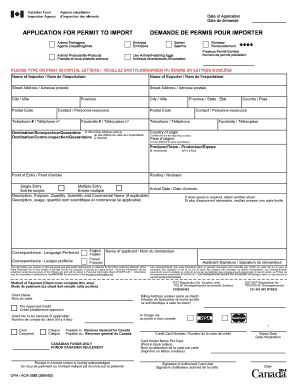
Date of Application Date de demandeAPPLICATION FOR PERMIT TO IMPORT Animal Pathogens Agents Zoopathognes Animal Products/ByProducts Produits et sousproduits animauxDEMANDE DE PERMIS POUR IMPORTER Embryos EmbryonsSemen SpermeRenewal RenouvellementPrevious.

How it works

  1. Open form

    Open form follow the instructions

  2. Easily sign form

    Easily sign the form with your finger

  3. Share form

    Send filled & signed form or save

How to fill out the APPLICATION FOR PERMIT TO IMPORT. CFIA / ACIA 5083 online

Filling out the APPLICATION FOR PERMIT TO IMPORT. CFIA / ACIA 5083 is an essential process for individuals and businesses seeking to import certain animal products and pathogens. This guide provides clear, step-by-step instructions to help you complete the form accurately and efficiently.

Follow the steps to successfully complete your import permit application.

  1. Press the ‘Get Form’ button to access the application form, and open it in the designated editing space.
  2. Begin by entering the date of your application in the appropriate field. This date indicates when you are submitting the application.
  3. Fill in the name of the importer. Ensure this is clearly typed or printed in capital letters for legibility.
  4. Proceed to enter the name of the exporter. Like the importer, use capital letters.
  5. Complete the street address for both the importer and the exporter. Be thorough in providing detailed addresses.
  6. Enter the city, province, and postal code for both parties involved in the import process. Make sure these align with the respective addresses.
  7. Identify a contact person for the importer and provide their telephone number. Ensure this contact is reachable for any follow-up questions.
  8. If the destination for the items being imported is different from the importer’s address, provide the new destination's street address, city, province, and postal code.
  9. Specify the country of origin for the products being imported. This must be indicated if it differs from the exporting country.
  10. In the section for items being imported, describe the products fully, including their purpose and scientific or commercial names if applicable. If more space is needed, attach additional sheets.
  11. Select the preferred language for communication regarding this application by marking English or French.
  12. Complete the method of payment section, including details such as client name, and provide your credit card details if relevant.
  13. Review the entire application for accuracy. Once all fields are filled out correctly, save your changes, and consider downloading, printing, or sharing the form as needed.

Get started by completing your APPLICATION FOR PERMIT TO IMPORT online today.

Get form

Experience a faster way to fill out and sign forms on the web. Access the most extensive library of templates available.
Get form

Related content

Import of Restricted Feeder Cattle from the United...
import. Application for an Import Permit. 1. The applicant must be a Canadian resident or...
Learn more
Contents - AgEcon Search
Foliar Application of Benzothiadiazole and Protection of Postharvest. Rockmelons and...
Learn more

Related links form

Mv 50 Bill Of Sale Form Tma Capital Provider Matrix Velamma Jim Clark Chemistry Pdf

Questions & Answers

Get answers to your most pressing questions about US Legal Forms API.

Contact support

Import Controls Under the EIPA , there are two types of import permits: General Import Permits ( GIP s) and Specific Import Permits.

Exporters need to register for an export or import/export business number ( BN ) account in order to submit export declarations to the CBSA . A BN account is free of charge. To obtain a business number or to confirm that your business number is still valid: call the Canada Revenue Agency ( CRA ) at 1-800-959-8886 or.

You need to get an import permit from the CFIA through its online portal and the plant's seller needs to make sure there is a phytosanitary certificate from the country of export. The plant needs to be free from soil, plant parts and other debris.

Export permits are issued either through (a) an on-line automated system either in the offices of customs brokers in major centres across Canada, or (b) in the offices of the Trade Controls & Technical Barriers Bureau of DFAIT in Ottawa.

How long does it take for a permit to be issued? A. It can take up to 30 days for a permit to be processed. Please apply 30 days before your first shipment arrives.

For information about CITES permits, visit Permits for trade in protected species. For assistance with the application form, contact cites@ec.gc.ca or call 1-855-869-8670.

The CITES document must contain either a purpose code or a written description of the purpose. Additional information is required for specific types of CITES documents such as pre-Convention certificates, annexes, or certificates of origin. The CITES document must indicate a code for the source of the specimen.

To obtain one, applicants must fill out the form Application for an Export and Import Permits Act (EIPA) File Number and provide DFAIT with the following: the applicant's name, title, firm name, address, postal code, telephone number, facsimile number and business number issued by Canada Revenue Agency (CRA).

Get This Form Now!

Use professional pre-built templates to fill in and sign documents online faster. Get access to thousands of forms.
Get form
If you believe that this page should be taken down, please follow our DMCA take down processhere.
Get APPLICATION FOR PERMIT TO IMPORT. CFIA / ACIA 5083
Get form
  • Adoption
  • Bankruptcy
  • Contractors
  • Divorce
  • Home Sales
  • Employment
  • Identity Theft
  • Incorporation
  • Landlord Tenant
  • Living Trust
  • Name Change
  • Personal Planning
  • Small Business
  • Wills & Estates
  • Packages A-Z
  • Affidavits
  • Bankruptcy
  • Bill of Sale
  • Corporate - LLC
  • Divorce
  • Employment
  • Identity Theft
  • Internet Technology
  • Landlord Tenant
  • Living Wills
  • Name Change
  • Power of Attorney
  • Real Estate
  • Small Estates
  • Wills
  • All Forms
  • Forms A-Z
  • Other Templates
  • Legal Hub
  • About Us
  • Help Portal
  • Legal Resources
  • Blog
  • Affiliates
  • Contact Us
  • Delete My Account
  • Site Map
  • Industries
  • Forms in Spanish
  • Localized Forms
  • State-specific Forms
  • Forms Kit
  • Real Estate Handbook
  • All Guides
  • Notarize
  • Incorporation services
  • For Consumers
  • For Small Business
  • For Attorneys
  • USLegal
  • FormsPass
  • pdfFiller
  • signNow
  • altaFlow
  • DocHub
  • Instapage
Form Packages
  • Adoption
  • Bankruptcy
  • Contractors
  • Divorce
  • Home Sales
  • Employment
  • Identity Theft
  • Incorporation
  • Landlord Tenant
  • Living Trust
  • Name Change
  • Personal Planning
  • Small Business
  • Wills & Estates
  • Packages A-Z
Form Categories
  • Affidavits
  • Bankruptcy
  • Bill of Sale
  • Corporate - LLC
  • Divorce
  • Employment
  • Identity Theft
  • Internet Technology
  • Landlord Tenant
  • Living Wills
  • Name Change
  • Power of Attorney
  • Real Estate
  • Small Estates
  • Wills
  • All Forms
  • Forms A-Z
  • Other Templates
Customer Service
  • Legal Hub
  • About Us
  • Help Portal
  • Legal Resources
  • Blog
  • Affiliates
  • Contact Us
  • Delete My Account
  • Site Map
  • Industries
  • Forms in Spanish
  • Localized Forms
  • State-specific Forms
  • Forms Kit
Legal Guides
  • Real Estate Handbook
  • All Guides
Prepared for you
  • Notarize
  • Incorporation services
Our Customers
  • For Consumers
  • For Small Business
  • For Attorneys
Our Sites
  • USLegal
  • FormsPass
  • pdfFiller
  • signNow
  • altaFlow
  • DocHub
  • Instapage
Social Media
Call us now toll free:
+1 833 426 79 33
As seen in:
© Copyright 1999-2026 airSlate Legal Forms, Inc. 17 Station Street, Suite 303, Brookline, MA 02445
  • Your Privacy Choices
  • Terms of Service
  • Privacy Notice
  • Content Takedown Policy
  • Bug Bounty Program