Loading
Get Accessrga
How it works
-

Open form follow the instructions
-

Easily sign the form with your finger
-

Send filled & signed form or save
How to fill out the Accessrga online
Filling out the Accessrga online can significantly streamline your medical claim process. This guide provides detailed instructions to ensure you complete the form accurately and efficiently.
Follow the steps to successfully complete your Accessrga form.
- Click ‘Get Form’ button to obtain the Accessrga online document and open it for editing.
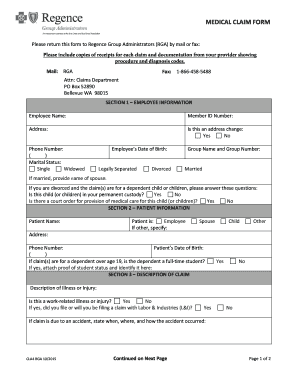
- Provide your employee information in Section 1. Enter your full name, member ID number, current address, and phone number. Indicate if this is an address change and specify your marital status. If applicable, include your spouse's name and details regarding dependents.
- In Section 2, fill in the patient information. Enter the patient's name, address, and specify their relationship to you. If the patient is over 19, indicate if they are a full-time student and attach proof of their status if needed.
- Section 3 requires a description of the claim. Clearly explain the illness or injury and identify if it relates to work. If it is an accident, detail when, where, and how it occurred.
- In Section 4, disclose any other group health insurance coverage. Indicate who is covered and provide details about the other carrier, including name, address, and phone number.
- Read and complete the certification in Section 5 by signing and dating the form to affirm that all information provided is accurate.
- If you would like to receive payment directly, sign in Section 6. Otherwise, payment will be made to the provider.
- Finally, in Section 7, authorize the release of information by signing and dating the section, allowing your provider to share necessary records with Regence Group Administrators.
- Once all sections are completed, review the form for accuracy. You can then save your changes, download the form, print it, or share it with necessary parties.
Complete your Accessrga form online today for a smooth claims process!
To reach a Customer Care representative for questions regarding eligibility, claims status, or to request a replacement ID card, please call 1-866-738-3924 Monday - Friday 6:00 AM. to 6:00 PM PT or log in to your RGA account and submit an electronic request.