Loading
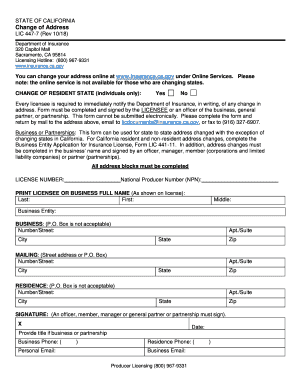
Get Lic 447-7 (rev 10/18)
How it works
-

Open form follow the instructions
-

Easily sign the form with your finger
-

Send filled & signed form or save
How to fill out the LIC 447-7 (Rev 10/18) online
Filling out the LIC 447-7 (Rev 10/18) form is essential for promptly updating your address with the Department of Insurance. This guide provides clear, step-by-step instructions to help you navigate the process effectively.
Follow the steps to complete your LIC 447-7 form accurately.
- Click the ‘Get Form’ button to access the LIC 447-7 form and open it in the editing interface.
- Begin by entering your license number and National Producer Number (NPN) in the designated fields to ensure your information is correctly identified.
- Print your full name as it appears on your license in the 'Full Name' section, including your last name, first name, and middle name if applicable.
- Provide the name of your business entity, if applicable. Note that a P.O. Box is not acceptable for the business address.
- Complete the 'Business Address' section by filling in your number/street, apartment/suite if necessary, city, state, and zip code.
- In the 'Mailing Address' section, fill out the street address or P.O. Box, along with your city, state, and zip code. If using a P.O. Box, ensure it's clearly noted.
- Next, fill out your residence address without a P.O. Box. Include your number/street, city, state, and zip.
- Sign the form in the designated area. This signature must be from an officer, member, manager, or general partner of the business or partnership.
- Enter the date of signing and provide your title if applicable, along with contact information including business phone, personal email, and residence phone.
- Review the completed form for accuracy, then save your changes. Download, print, or share the form as needed for submission.
Start filling out your LIC 447-7 form online today to ensure your information is up to date.
California is reciprocal with other states for non-resident licensing of public insurance adjusters. Consequently, non-resident applicants are not required to take the qualifying exam.