Loading
Get Sdlt3
How it works
-

Open form follow the instructions
-

Easily sign the form with your finger
-

Send filled & signed form or save
How to fill out the Sdlt3 online
Filling out the Sdlt3 form is essential for providing additional details when the main Land Transaction Return does not capture all necessary information. This guide will walk you through each section of the form to ensure you provide the correct information efficiently.
Follow the steps to complete the Sdlt3 form online.
- Click ‘Get Form’ button to obtain the form and open it in the editor.
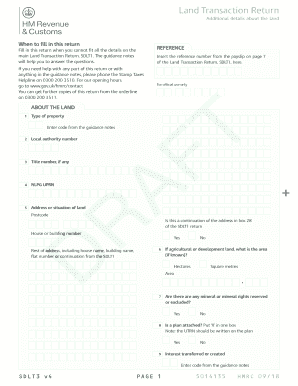
- Locate the 'About the land' section. Here, you will provide information regarding the type of property. Enter the appropriate code as specified in the guidance notes.
- Next, input the local authority number associated with the property.
- If there is a title number available, enter it in the corresponding field.
- Provide the NLPG UPRN number, if applicable. After that, fill in the address or situation of the land, including the postcode.
- Indicate if this address continues from box 28 of the SDLT1 return by selecting 'Yes' or 'No'. If applicable, complete the rest of the address information.
- For agricultural or development land, specify the area in hectares or square metres.
- Indicate whether any mineral or mineral rights are reserved or excluded by selecting 'Yes' or 'No'.
- Select ‘Yes’ or ‘No’ to confirm if a plan is attached. If yes, ensure the UTRN is written on the plan.
- Lastly, confirm the interest transferred or created by entering the appropriate code from the guidance notes.
- Once you have completed the form, you can save changes, download, print, or share the form as needed.
Complete your Sdlt3 form online today to ensure accurate land transaction reporting.
ZIP Code™ validation. Sending mail to the wrong person—or sending it to an undeliverable address—can cost a lot of time and money. You have to resend the mail and pay for new postage. ZIP Code™ verification helps get rid of costly mistakes by making sure postal addresses are correct before you head to the post office.