Loading
Get Plasmacell-c Product Performance Report
How it works
-

Open form follow the instructions
-

Easily sign the form with your finger
-

Send filled & signed form or save
How to fill out the PLASMACELL-C Product Performance Report online
This guide provides detailed instructions on completing the PLASMACELL-C Product Performance Report online. It aims to simplify the process and ensure you provide accurate and necessary information.
Follow the steps to complete the report effectively.
- Press the ‘Get Form’ button to access the form and open it in your editor.
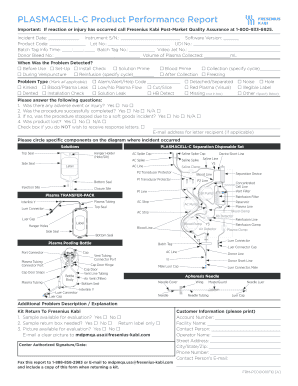
- In the first section, fill in the incident date and the instrument serial number. Ensure these details are accurate to help with the processing of the report.
- Next, provide the software version, product code, lot number, and UDI number. These identifiers are crucial for tracking the specific product involved in the incident.
- Fill out the batch tag information, including the batch tag time and batch tag number. This information helps link the report to the specific batch of products.
- Indicate the donor bleed number and the volume of plasma collected. Be precise with the volume to ensure accurate assessments.
- Select when the problem was detected by marking the appropriate option from 'Before Use' to 'Reinfusion.' Check all that apply.
- Identify the problem type by marking all applicable options, such as 'Kinked' or 'Blood/Plasma Leak.' The greater the detail, the better the analysis can be.
- Answer the subsequent questions regarding adverse events, the completion of the procedure, and any product loss. Be truthful to maintain the integrity of the report.
- If you do not wish to receive response letters, check the provided box. Also, enter the email address for the letter recipient if applicable.
- Review the diagram of the PLASMACELL-C Separation Disposable Set and circle the specific components where the incident occurred.
- In the 'Additional Problem Description' section, provide any extra information or explanations about the incident.
- Complete the customer information section by providing the account number, facility name, contact person, and operator name.
- Finally, ensure you have a center authorized signature and date before saving your changes. Submit the form as outlined, including faxing or emailing it with a copy of this report when returning a kit.
Complete your PLASMACELL-C Product Performance Report online now to ensure proper documentation and support.
A radio button or option button is a graphical control element that allows the user to choose only one of a predefined set of mutually exclusive options. The singular property of a radio button makes it distinct from checkboxes, where the user can select and unselect any number of items.