Loading
Form preview
  • US Legal Forms
  • Form Library
  • More Forms
  • More Uncategorized Forms
  • Dr Beth Comeau

Get Dr Beth Comeau

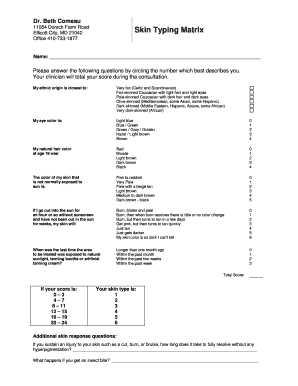
Dr. Beth Comeau 11054 Dorsch Farm Road Ellicott City, MD 21042 Office 4107331877Skin Typing MatrixName: Please answer the following questions by circling the number which best describes you. Your.

How it works

  1. Open form

    Open form follow the instructions

  2. Easily sign form

    Easily sign the form with your finger

  3. Share form

    Send filled & signed form or save

How to fill out the Dr Beth Comeau online

Filling out the Dr Beth Comeau skin typing matrix online is an essential step in understanding your skin type and response. This guide provides a clear, step-by-step process to ensure accurate completion of the form.

Follow the steps to fill out the form accurately:

  1. Click ‘Get Form’ button to obtain the form and open it in the editor.
  2. Begin by entering your full name in the designated field to identify your application.
  3. Proceed to answer the questions by circling the number that best describes your ethnic origin, eye color, and natural hair color at age 18. Ensure you take your time to choose the most accurate option.
  4. Continue to fill out the questions regarding your unexposed skin color and skin response to sun exposure. Circle the respective number for each question.
  5. Input the date of your last exposure to sunlight, tanning booths, or tanning creams by selecting the appropriate choice.
  6. After completing the questionnaire, calculate your total score by adding the numbers you circled. Reference the score ranges to determine your skin type.
  7. Provide answers to the additional skin response questions addressing healing time for injuries and reactions to insect bites.
  8. Review all your entries for accuracy and completeness. Once satisfied, you can save changes, download the completed form, print it, or share it as needed.

Complete your skin typing matrix online now for a personalized consultation.

Get form

Experience a faster way to fill out and sign forms on the web. Access the most extensive library of templates available.
Get form

Related content

Sanctioned Providers from Participation in...
Nov 2, 2016 — 10/29/2015 146 Chartley Drive Ste 100 Reisterstown MD 21136. A&E Home Care...
Learn more
Physical Therapy | Departments | College of Health...
Combined Doctor of Physical Therapy/PhD in Rehabilitation Sciences ... residency program...
Learn more
Huff (serial telewizyjny) - Huff (TV series)...
Hank Azaria jako dr Craig „Huff” Huffstodt: psychiatra z Los Angeles, którego życie...
Learn more

Related links form

National Directory Of Contacts OFFICE VISIT AUTHORIZATION REQUEST FORM Order Form For Prints Of Artwork Allergan Plastic Surgery Product Order Form - Natrelle

Questions & Answers

Get answers to your most pressing questions about US Legal Forms API.

Contact support

0:12 1:22 Access 2016 Tutorial Setting Default Values for Fields Microsoft Training YouTube Start of suggested clip End of suggested clip .att.com/biz for example you may have a yes/no field for which you want to set a default value ofMoreWww.att.com/biz for example you may have a yes/no field for which you want to set a default value of know. The value that you set can be a number a text value a date or even some sort of calculated

A default value is the value that is inserted into a column when an explicit value is not specified in an INSERT statement.

Click on the DateTime field and notice the list of field properties at the bottom of the window. Find the Default Value property. The Default Value is the value that a new record starts out with. You can change it if you want, but Access will create new records with this value.

Set a default value Select the field that you want to change. On the General tab, type a value in the Default Value property box. The value you that you can enter depends on the data type that is set for the field. For example, you can type =Date() to insert the current date in a Date/Time field.

You add a default value to a table field or form control whenever you want Access to enter a value in a new record automatically. For example, you can have Access always add the current date to new orders. Typically, you add a default value to your table fields.

Select the column for which you want to specify a default value. In the Column Properties tab, enter the new default value in the Default Value or Binding property. To enter a numeric default value, enter the number.

The DefaultValue property specifies text or an expression that's automatically entered in a control or field when a new record is created.

Change a Controls Default Value Display the form in Design View or Layout View with the Property Sheet displayed. Select the desired control. Click the Data tab. Click the Control Source box and type the default value you want to appear for new records.

Get This Form Now!

Use professional pre-built templates to fill in and sign documents online faster. Get access to thousands of forms.
Get form
If you believe that this page should be taken down, please follow our DMCA take down processhere.

Industry-leading security and compliance

US Legal Forms protects your data by complying with industry-specific security standards.
  • In businnes since 1997
    25+ years providing professional legal documents.
  • Accredited business
    Guarantees that a business meets BBB accreditation standards in the US and Canada.
  • Secured by Braintree
    Validated Level 1 PCI DSS compliant payment gateway that accepts most major credit and debit card brands from across the globe.
Get Dr Beth Comeau
Get form
  • Adoption
  • Bankruptcy
  • Contractors
  • Divorce
  • Home Sales
  • Employment
  • Identity Theft
  • Incorporation
  • Landlord Tenant
  • Living Trust
  • Name Change
  • Personal Planning
  • Small Business
  • Wills & Estates
  • Packages A-Z
  • Affidavits
  • Bankruptcy
  • Bill of Sale
  • Corporate - LLC
  • Divorce
  • Employment
  • Identity Theft
  • Internet Technology
  • Landlord Tenant
  • Living Wills
  • Name Change
  • Power of Attorney
  • Real Estate
  • Small Estates
  • Wills
  • All Forms
  • Forms A-Z
  • Form Library
  • Legal Hub
  • About Us
  • Help Portal
  • Legal Resources
  • Blog
  • Affiliates
  • Contact Us
  • Delete My Account
  • Site Map
  • Industries
  • Forms in Spanish
  • Localized Forms
  • State-specific Forms
  • Forms Kit
  • Real Estate Handbook
  • All Guides
  • Notarize
  • Incorporation services
  • For Consumers
  • For Small Business
  • For Attorneys
  • USLegal
  • FormsPass
  • pdfFiller
  • signNow
  • altaFlow
  • DocHub
  • Instapage
Form Packages
  • Adoption
  • Bankruptcy
  • Contractors
  • Divorce
  • Home Sales
  • Employment
  • Identity Theft
  • Incorporation
  • Landlord Tenant
  • Living Trust
  • Name Change
  • Personal Planning
  • Small Business
  • Wills & Estates
  • Packages A-Z
Form Categories
  • Affidavits
  • Bankruptcy
  • Bill of Sale
  • Corporate - LLC
  • Divorce
  • Employment
  • Identity Theft
  • Internet Technology
  • Landlord Tenant
  • Living Wills
  • Name Change
  • Power of Attorney
  • Real Estate
  • Small Estates
  • Wills
  • All Forms
  • Forms A-Z
  • Form Library
Customer Service
  • Legal Hub
  • About Us
  • Help Portal
  • Legal Resources
  • Blog
  • Affiliates
  • Contact Us
  • Delete My Account
  • Site Map
  • Industries
  • Forms in Spanish
  • Localized Forms
  • State-specific Forms
  • Forms Kit
Legal Guides
  • Real Estate Handbook
  • All Guides
Prepared for you
  • Notarize
  • Incorporation services
Our Customers
  • For Consumers
  • For Small Business
  • For Attorneys
Our Sites
  • USLegal
  • FormsPass
  • pdfFiller
  • signNow
  • altaFlow
  • DocHub
  • Instapage
Social Media
Call us now toll free:
+1 833 426 79 33
As seen in:
© Copyright 1999-2026 airSlate Legal Forms, Inc. 3720 Flowood Dr, Flowood, Mississippi 39232
  • Your Privacy Choices
  • Terms of Service
  • Privacy Notice
  • Content Takedown Policy
  • Bug Bounty Program