Loading
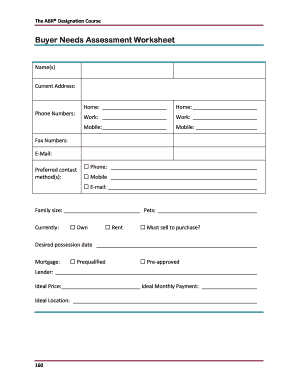
Get Buyer Needs Assessment Worksheet - Learning Library Inc.
How it works
-

Open form follow the instructions
-

Easily sign the form with your finger
-

Send filled & signed form or save
How to use or fill out the Buyer Needs Assessment Worksheet - Learning Library Inc. online
Filling out the Buyer Needs Assessment Worksheet is an essential step for users seeking to clarify their property preferences and requirements. This guide provides a comprehensive overview of each section and field of the form to help users complete it effectively and accurately in an online format.
Follow the steps to complete your Buyer Needs Assessment Worksheet smoothly.
- Click the ‘Get Form’ button to access the Buyer Needs Assessment Worksheet and open it in your editing platform.
- Begin filling out the personal information section. Enter your name(s) and current address. Ensure all details are accurate and clearly stated.
- Provide your phone numbers, including home, work, and mobile. Make sure to format the numbers properly for ease of communication.
- Specify your preferred contact method(s) by selecting 'Phone', 'Mobile', or 'E-mail'. This will help the relevant parties reach you more effectively.
- Indicate your family size and whether you have any pets. Also, clarify your living situation by selecting 'Own', 'Rent', or 'Must sell to purchase?'
- Fill in your desired possession date as well as your mortgage status by selecting either 'Prequalified' or 'Pre-approved' and include lender information.
- State your ideal price and ideal monthly payment preferences along with your desired location for the property.
- Complete the sections for the number of bedrooms and bathrooms required, along with any additional specifications such as lot size and garage capacity.
- Specify the age and style of the home you are looking for, and any special requirements you may have to accommodate your lifestyle.
- Provide insights about your ideal home by describing key features and aspects that are important to you.
- Reflect on your home search experience by answering questions about how long you have been looking, how you have been searching, and if you have seen any properties of interest.
- Indicate any deal-breaker features that you will not compromise on, and share any additional information that could help your agent understand your needs better.
- Once you have completed filling out the worksheet, you can save your changes, download the document, print it, or share it as necessary.
Complete your Buyer Needs Assessment Worksheet online today to ensure a tailored home buying experience.
Related links form
Adding a Credit Card On your account homepage click your name, then click Account Settings. On the Account Settings tab, next to Add Credit Card, select a card type from the drop-down menu, Enter your credit card number in the fields provided. ... After you click Save, the Add Small Business Credit Card appears.