Loading
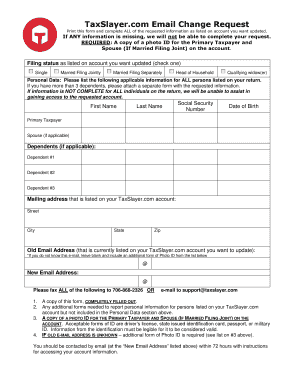
Get Taxslayer.com Email Change Request
How it works
-

Open form follow the instructions
-

Easily sign the form with your finger
-

Send filled & signed form or save
How to fill out the TaxSlayer.com Email Change Request online
Completing the TaxSlayer.com Email Change Request form is essential for users looking to update their email address associated with their account. This guide will provide you with a clear and detailed process to fill out the form accurately and ensure a smooth submission.
Follow the steps to complete your email change request
- Press the ‘Get Form’ button to access the TaxSlayer.com Email Change Request form and open it in the required format.
- Fill in the filing status as indicated on your account. Choose one option from the following: Single, Married Filing Jointly, Married Filing Separately, Head of Household, or Qualifying widow(er).
- Provide personal data for all individuals associated with your tax return. This includes the Primary Taxpayer, Spouse (if applicable), and Dependents (if applicable). Enter the following information for each person: First Name, Last Name, Social Security Number, and Date of Birth. If you have more than three dependents, attach an additional form with their details.
- Enter the mailing address currently associated with your TaxSlayer.com account, including Street, City, State, and Zip.
- Provide the old email address linked to your TaxSlayer.com account that you wish to update. If you do not know this email address, leave this field blank and submit an additional form of photo identification.
- Enter the new email address you wish to use for your TaxSlayer.com account.
- Ensure that you have a copy of a photo ID for the Primary Taxpayer and Spouse (if married filing jointly) ready to submit. Acceptable forms of ID include a driver's license, state-issued ID, passport, or military ID.
- Fax the completed form and all required documents to 706-868-2326 or email them to support@taxslayer.com. Make sure to include this form, any additional forms needed to report personal information, and the required photo identification.
- After submission, expect to be contacted by email (at the new email address provided) within 72 hours with instructions for accessing your account.
Take action now and complete your TaxSlayer.com Email Change Request online!
Related links form
Creating a New Gmail Address Within Google, it's not possible to change your email address – therefore you need to create a new one. To create a new email address, you need to set up a new Gmail account: Step 1. Go to the Google Account creation page.