Loading
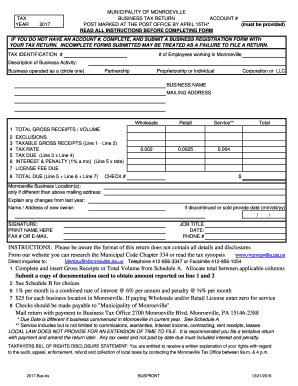
Get Monroeville Business Tax Return
How it works
-

Open form follow the instructions
-

Easily sign the form with your finger
-

Send filled & signed form or save
How to fill out the Monroeville Business Tax Return online
Filling out the Monroeville Business Tax Return online can streamline the process and ensure compliance with local tax regulations. This guide provides step-by-step instructions to help you navigate the form with ease.
Follow the steps to complete your tax return accurately and efficiently.
- Click ‘Get Form’ button to obtain the form and open it in the editor.
- Enter your account number in the designated field. If you do not have an account number, you must complete and submit a business registration form along with your tax return.
- Fill out the tax identification number. Ensure accuracy as it is crucial for processing your return.
- Indicate the number of employees working in Monroeville by entering the total in the provided field.
- Describe your business activity by selecting the appropriate category: Partnership, Proprietorship or Individual, Corporation, or LLC. Circle the correct option.
- Provide the business name and mailing address in the designated fields to ensure that all correspondence is directed to the correct location.
- Report your total gross receipts or volume on line 1, ensuring that this is a true and accurate reflection of your business's income.
- Detail any exclusions to gross receipts from Schedule B. Enter the amounts for any applicable exclusions on the lines provided.
- Calculate your taxable gross receipts by subtracting the exclusions from the total reported in line 1. Enter this amount on line 3.
- Select the appropriate tax rate from the provided options and enter it in line 4.
- Calculate the tax due by multiplying the taxable gross receipts (line 3) by the tax rate (line 4) and enter this figure on line 5.
- If applicable, calculate any interest and penalty fees on line 6. This is 1% per month on any unpaid tax.
- Include the license fee due for your business location on line 7 and ensure all applicable fees are incorporated.
- Add the amounts on lines 5, 6, and 7 to calculate the total due. Enter this total on line 8.
- Provide details if there have been any changes from the previous year, including the name or address of a new owner if applicable.
- Sign the form, print your name, and include your job title, telephone number, fax number, or email, along with the date.
- Review the completed form for accuracy and completeness, then save your changes and prepare to submit either by downloading, printing, or sharing the form as needed.
Complete your Monroeville Business Tax Return online to ensure compliance and accurate reporting.
Get form
Experience a faster way to fill out and sign forms on the web. Access the most extensive library of templates available.
Get This Form Now!
Use professional pre-built templates to fill in and sign documents online faster. Get access to thousands of forms.