Loading
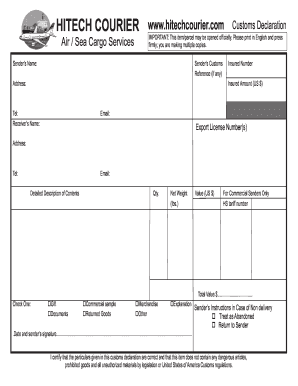
Get Hitech Customs Declaration Form.pdf - Hitech Courier
How it works
-

Open form follow the instructions
-

Easily sign the form with your finger
-

Send filled & signed form or save
How to fill out the Hitech Customs Declaration Form.pdf - Hitech Courier online
Completing the Hitech Customs Declaration Form is essential for ensuring your parcel is processed swiftly and accurately. This guide will walk you through each section of the form, offering clear instructions to make the process easier for users of all experience levels.
Follow the steps to complete your customs declaration form successfully.
- Click the ‘Get Form’ button to obtain the Hitech Customs Declaration Form and open it for editing.
- Begin by entering the sender’s name in the designated field. This should be the individual or organization sending the parcel.
- Input the sender’s customs reference number if applicable. This helps in tracking your declaration.
- Provide the complete address of the sender where the parcel is coming from.
- Fill in the insured number and the insured amount in US dollars if the parcel is insured.
- Enter the sender’s telephone number and email address for communication purposes.
- Next, fill out the receiver's name, mailing address, telephone number, and email address similarly.
- In the section labeled 'Detailed Description of Contents', provide a comprehensive description of what is being sent.
- Indicate the quantity and net weight of the contents in pounds.
- Next, specify the total gross weight of the parcel.
- Check one option from the list to classify the parcel, such as Gift, Documents, Commercial Sample, Returned Goods, Merchandise, Other.
- State the total value of the contents in US dollars. This declaration is crucial for customs purposes.
- If you are a commercial sender, include the HS tariff number and country of origin of the goods.
- Instruct what should happen in case of non-delivery by checking either 'Treat as Abandoned' or 'Return to Sender'.
- Finally, enter the date and affix the sender’s signature to certify the accuracy of the information provided.
- Once you have completed all fields, you may save your changes, download a copy, print the form, or share it as required.
Complete your Hitech Customs Declaration Form online today for a smooth shipping experience.
Each individual arriving into the United States must complete the CBP Declaration Form 6059B. Explanations and a sample declaration form can be found on the Sample Customs Declaration Form.