Loading
Get Wincca
How it works
-

Open form follow the instructions
-

Easily sign the form with your finger
-

Send filled & signed form or save
How to fill out the Wincca online
Navigating the Wincca form can seem daunting, but with clear guidance, you can complete it efficiently and accurately. This guide provides step-by-step instructions to help you fill out the Wincca online with ease.
Follow the steps to successfully complete the Wincca form.
- Click ‘Get Form’ button to obtain the form and open it in the editor.
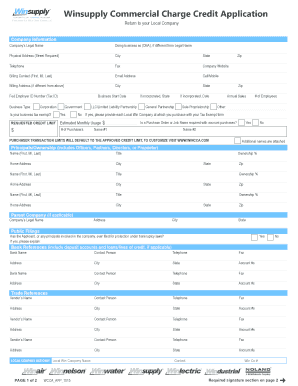
- Begin by entering your company's legal name in the appropriate field. If your business operates under a different name, fill in the 'Doing business as (DBA)' section.
- Provide your company's physical address, including street, city, state, and zip code.
- Enter your telephone number and fax number, if applicable.
- Fill out the company's website and the billing contact's name, email address, and cell/mobile number.
- If your billing address is different from above, complete the billing address section.
- Input your Federal Employer ID Number (Tax ID) and select your business type from the provided options.
- Indicate if your business is tax exempt and provide the name of the local Win Company where you make purchases, if applicable.
- Fill in your requested credit limit and estimated monthly usage details.
- List the names of purchasers associated with the account and their respective transaction limits.
- Complete the section for principals/ownership by providing the required information for each person involved in the ownership of the business.
- Add any required bank references and trade references, ensuring you include all necessary contact details.
- If applicable, check the box to confirm if the applicant has ever filed for protection under bankruptcy laws and provide details.
- Review all entries for accuracy before moving on to sign the required signature section.
- Once all fields are completed, you can either save your changes, download, print the form, or share it based on your requirement.
Start filling out the Wincca form online today to streamline your credit application process.
You can check your credit card balance through your online account or by using the Mobile app. Other ways to check your card balance include contacting by phone at 1-800-227-4825 or by texting 's virtual assistant, Eno.