Loading
Get Economy Price Plan Application - Benefitscheckup
How it works
-

Open form follow the instructions
-

Easily sign the form with your finger
-

Send filled & signed form or save
How to fill out the ECONOMY PRICE PLAN APPLICATION - BenefitsCheckUp online
The ECONOMY PRICE PLAN APPLICATION is an essential document designed to help users access economic pricing options for their utility services. This guide will provide a comprehensive overview of how to fill out this application accurately and efficiently online.
Follow the steps to complete your application online effectively.
- Press the ‘Get Form’ button to access the application form online. Ensure that you have a stable internet connection to facilitate the download.
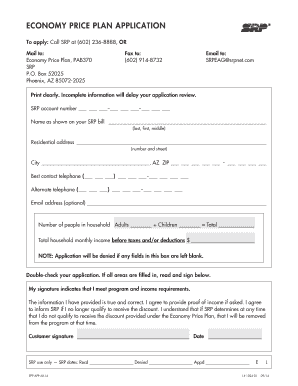
- Begin by entering your SRP account number in the designated field, formatted as three digits, a hyphen, three digits, a hyphen, and four digits (e.g., 123-456-7890). This information identifies your account with the utility provider.
- In the name field, provide the name as it appears on your SRP bill. Write your last name followed by your first and middle names clearly to avoid any processing delays.
- Next, fill in your residential address, including the number and street name. Ensure all details are accurate for proper correspondence.
- Indicate your city, followed by ‘AZ’ for Arizona, and complete your ZIP code accurately. This information is crucial for service eligibility.
- Provide your best contact telephone number, ensuring you include the area code. Include an alternate telephone number if available to facilitate communication regarding your application.
- If you wish, include your email address, which is optional but helpful for receiving updates about your application and eligibility status.
- Calculate and enter the total number of people in your household by adding the number of adults and children, as requested. This will help determine your qualification for the program.
- Input your total household monthly income before taxes and/or deductions. Ensure this field is filled in, as leaving it blank will result in an application denial.
- Review all the information you provided on the form to ensure accuracy. Your application may be delayed if any information is incomplete.
- Read the declaration statement carefully. By signing, you confirm that you meet the program requirements and agree to provide proof of income if requested. Sign and date the form accordingly.
Complete your ECONOMY PRICE PLAN APPLICATION online today!