Loading
Get School Age Endorsement
How it works
-

Open form follow the instructions
-

Easily sign the form with your finger
-

Send filled & signed form or save
How to fill out the School Age Endorsement online
This guide provides clear and detailed instructions for users on how to complete the School Age Endorsement application online. Whether you are new to the process or have some experience, this guide aims to support you in filling out the necessary forms accurately.
Follow the steps to successfully complete the application.
- Click ‘Get Form’ button to acquire the School Age Endorsement form and access it in the preferred editing format.
- Create a profile in the Ohio Professional Registry by providing the necessary personal and professional details.
- In your registry profile, navigate to the Education tab and upload all required educational documents for review.
- Complete all required online trainings, ensuring that you meet the educational criteria for the endorsement.
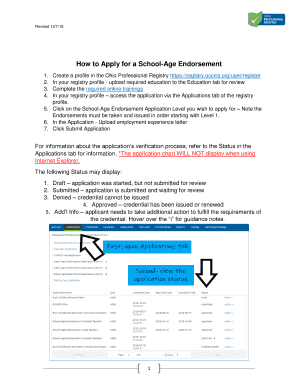
- Return to your registry profile and access the application via the Applications tab. Select the School Age Endorsement Application Level that you wish to apply for, noting that the endorsements must be processed in sequential order starting with Level 1.
- Within the application, upload the required employment experience letter that details your relevant experience working with children.
- Carefully review your application and then click Submit Application to send your completed form for processing.
- To check the status of your application, refer to the Applications tab where you will find updates on your submission, including statuses such as Draft, Submitted, Denied, Approved, or Additional Info.
- After your application has been successfully submitted, you have the option to save changes, download, print, or share your application as needed.
Begin your application process now and complete your School Age Endorsement online.