Loading
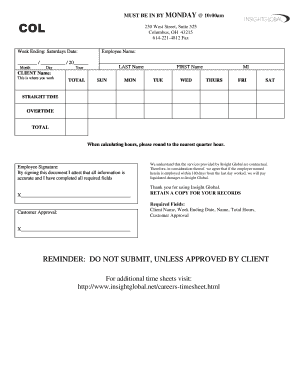
Get Insight Global Timetrak
How it works
-

Open form follow the instructions
-

Easily sign the form with your finger
-

Send filled & signed form or save
How to fill out the Insight Global Timetrak online
Filling out the Insight Global Timetrak is an essential task for ensuring accurate timekeeping. This guide will walk you through the process step-by-step, making it easier for you to complete the form correctly and efficiently.
Follow the steps to complete the Insight Global Timetrak online
- Click the ‘Get Form’ button to access the Insight Global Timetrak and open it for editing.
- Fill in the ‘Week Ending’ field with the Saturday date of the week for which you are reporting your hours.
- Enter your personal information by filling in the ‘Employee Name’ section. Include your last name, first name, and middle initial in the respective fields.
- In the ‘Client Name’ section, input the name of the client where you are working.
- Record your total hours worked throughout the week by completing the daily fields for Sunday through Saturday. Ensure you classify the hours into straight time and overtime as applicable.
- When calculating your hours, remember to round to the nearest quarter hour. Sum the total hours and fill in the ‘TOTAL’ field.
- Sign the form in the designated ‘Employee Signature’ area, affirming that all information is accurate and all required fields have been completed.
- Request customer approval by ensuring the client signs in the ‘Customer Approval’ section. This signature is crucial before submission.
- Review the entire form for completeness and accuracy. Make any necessary corrections.
- Once all fields are filled out and approved, save your changes, and if needed, download, print, or share the form for your records.
Begin filling out your Insight Global Timetrak online today to ensure timely submission.
Insight Global, acquired by Harvest Partners in 2010, is a leading provider of supplemental staffing of IT professionals to Fortune 1000 companies.